Most businesses in Egypt and the Gulf sell in chat. The website is where people land from an ad or a search, read for a minute, and leave with a question they never asked: do you deliver to my city, is this in stock, how much is the installation. A contact form does not catch that question. A phone number does not catch it at eleven at night. A live chat on the website that answers in three seconds does — if it is an AI chatbot that knows your business, not a box waiting for an agent.
We built website chat into ExceliaBOT this month, put it on our own site first, and switched it on for every account this week. This is what we learned about what an AI chatbot for a website should do in 2026, what it should ask, where the conversations should go, how to add it to WordPress, Shopify or any site — and the numbers from our own first days.
In short
- A website chat is worth having only if it answers instantly and collects a way to follow up. An offline agent and a "we will get back to you" are a form with extra steps.
- It should be the same assistant that answers your WhatsApp, with the same instructions and catalogue. Two bots with two brains give two answers.
- Ask for a name always, a phone number when you follow up on WhatsApp, an email for business customers. Nothing else.
- Unlike WhatsApp, a website thread has no 24-hour window — but the visitor only sees your reply while the page is open. The phone number is what makes the lead real.
- On our own site, the first two days brought 16 chats from 286 visitors; every one of them left a phone or an email.
What an AI chatbot for a website should do in 2026
The old live chat for a website was a box in the corner with a photo of an agent and the words "typically replies in a few hours". It made the visitor type a question into the void and leave. The version worth installing today does four things:
- Answers at once, from your own information. Not a scripted menu — an assistant that read your instructions, your prices and your catalogue, and answers the question that was actually asked, in the language it was asked in.
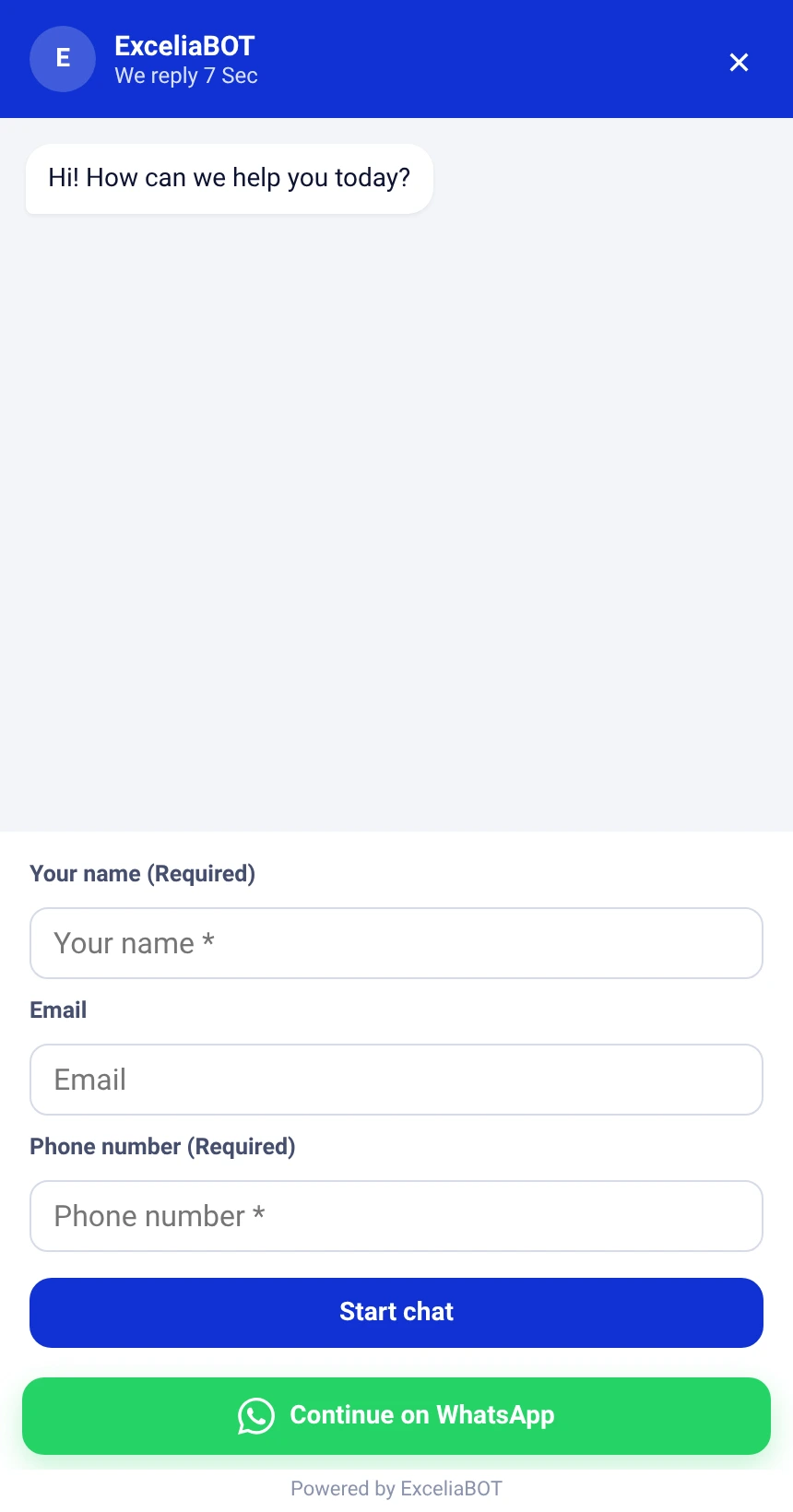
- Collects a way to follow up before the chat starts. A name and a phone number take ten seconds and turn a visitor into a lead you can reach tomorrow.
- Hands over to a human the moment it should. A price negotiation, a complaint, an order with ten options — the assistant stops and your team continues in the same thread.
- Lands in the inbox your team already works in, next to the WhatsApp, Messenger and Instagram conversations, not in a separate tool with a separate login.
One assistant, not two
The mistake we see most is a separate website chatbot — a different product with its own "training", its own canned answers and its own idea of your opening hours. The website says shipping takes two days, WhatsApp says three, and the customer who used both trusts neither.
On ExceliaBOT the website chat widget is the same AI customer service chatbot that answers your WhatsApp, Messenger and Instagram. You write the instructions once, in plain language, on the AI Prompt page; the catalogue is the same catalogue; a change to either reaches every channel at once. The visitor on your website gets the same answer, in the same voice, as the customer on WhatsApp — and both threads sit in the same inbox.
What to ask before the chat starts
Everything you ask costs you visitors. Our rule after watching the first chats come in:
| Field | Ask it when | Why |
|---|---|---|
| Name | Always | The assistant greets the person and the thread has a name in your inbox. |
| Phone | You follow up on WhatsApp — most businesses in the region do | The visitor may close the page before you reply; the number is how the lead survives. |
| You sell to companies, or your follow-up is an invoice or a document | Business buyers hand out an email more readily than a number. |
Make a field required only when the chat is useless without it. A phone number marked required cuts the chats that start, but every chat that starts is a lead you can reach — for a store that follows up on WhatsApp that trade is worth it; for a page that mostly answers questions it is not.
The greeting bubble, and when it should appear
A chat icon alone is easy to ignore. A short line beside it — "Have a question? Ask me" — is what makes people click. Two rules keep it from being annoying: show it once a day per visitor, a few seconds after the page loads, never while the chat is already open; and on phones let it disappear by itself after a few seconds so it does not sit on top of the page.
The bubble is on by default and you can change its text, its delay or switch it off. We count how many visitors opened the chat from it, so you can see whether it earns its place. On our site, 8 of the first 16 chats started from the bubble.
No 24-hour window — but a shorter one of a different kind
WhatsApp lets a business reply freely only within 24 hours of the customer's last message; after that it takes a paid template. A website thread has no such rule: your team can reply whenever it likes, from the same inbox, at no cost.
The catch is on the other side. The visitor sees your reply while the chat is open on your site, and finds the thread again if they come back on the same browser — but if they closed the tab and never return, your reply waits unread. That is exactly why the form asks for a phone number, and why the chat carries a Continue on WhatsApp button. Many businesses search for a "WhatsApp chat button for the website" — this is that button with an assistant in front of it: the visitor who wants a longer conversation moves it to your number with one tap, and from then on it is a WhatsApp thread like any other.

How to add the chat widget to your website: WordPress, Shopify, Wix or custom
There is no chatbot WordPress plugin to install and no Shopify app to configure. The whole installation is one line of code, pasted once before the closing body tag of every page:
- WordPress: the theme's footer file, or any "header and footer code" plugin, in the footer slot.
- Shopify: Online Store → Themes → Edit code → theme.liquid, just before the closing body tag.
- Wix, Squarespace, Webflow: the site's custom-code setting, "end of body".
- A site your developer built: send them the line; it goes in the shared layout.
Reload the site and the bubble is in the corner. Everything else — the title, the colour, the texts in Arabic and English, the fields, the greeting bubble, the allowed websites — is set from the dashboard and reaches your site within minutes without touching the code again. One thing we ask every client to do on day one: list your own domains under Allowed websites, so a site that copies your code does not get your assistant for free.
The step-by-step with screens is in the help center: Website chat: the assistant on your website.
What we measured on our own site
We installed the chat on bot.exceliamarketing.com on the evening of 9 October. Two days later the page of numbers read:
| First two days | |
|---|---|
| Page views with the chat installed | 683 |
| Visitors | 286 |
| Chats started | 16 |
| Visitors who left a phone or an email | 16 |
| Chats opened from the greeting bubble | 8 |
Two things stood out. Every single chat left a phone or an email, because the form asked and the question was worth ten seconds. And half the chats started from the greeting bubble, which on a site like ours — people arriving from an ad, reading, deciding — is the difference between a question asked and a question taken home.
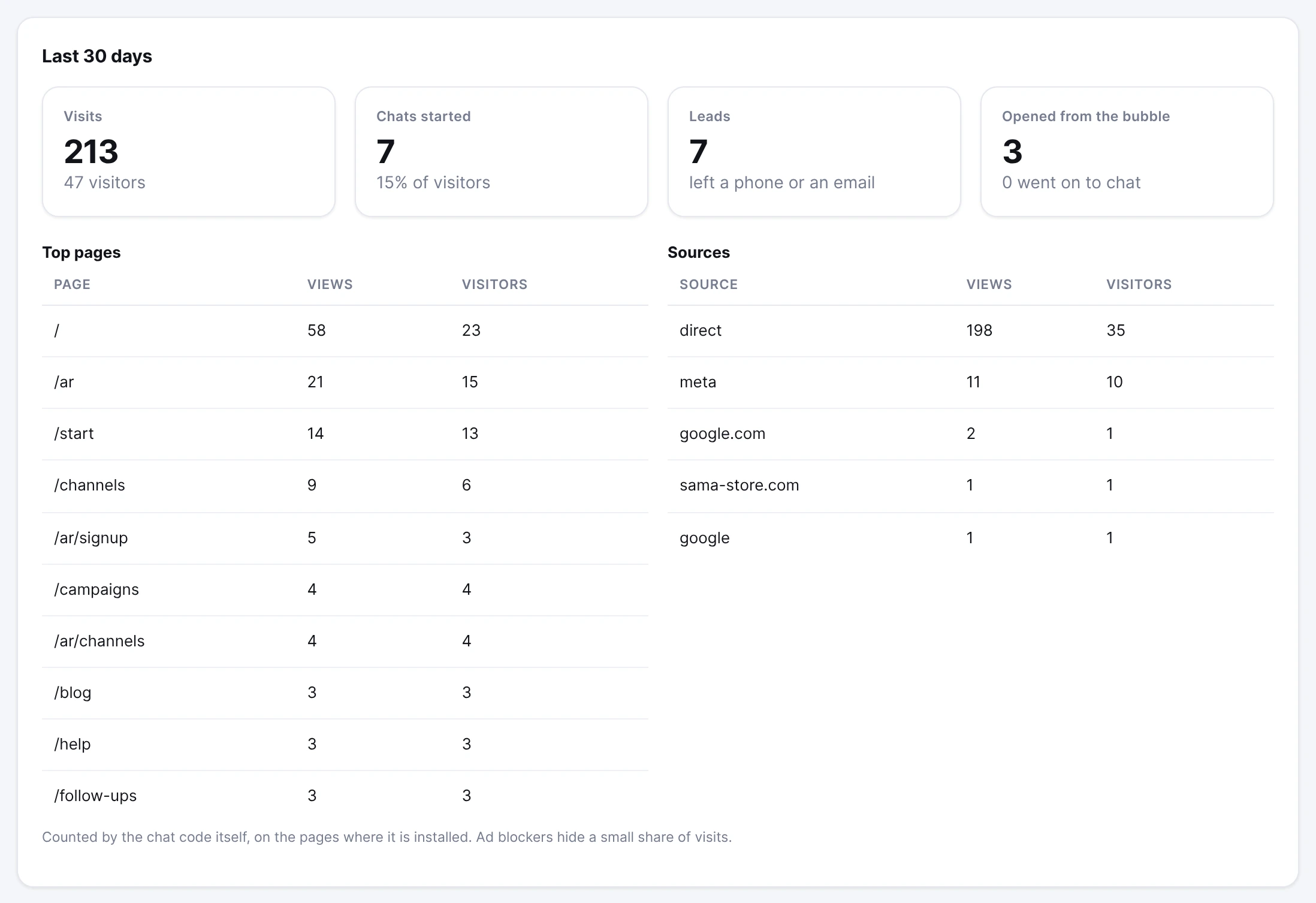
Sixteen chats are not a study. They are the first two days of one site. We will publish the numbers again when they are a month old, and with more than one site behind them.
Good manners
Three habits that keep a website chat welcome rather than tolerated:
- Say it is an assistant. The welcome line can say so in four words, and the visitor who wants a person asks for one — the assistant hands over.
- Ask for what you will use. A phone number you never call is a reason not to come back.
- Reply to the thread, not just the lead. A visitor who left a question at night and found an answer in the morning — on the chat, or on WhatsApp — is a customer. One who found silence is a number in a sheet.
Frequently asked
Is there a free AI chatbot for a website?
Yes. The ExceliaBOT free plan includes the website chat with 50 AI replies a month, no card, no time limit, and every new account gets its first 15 days on the base plan.
Do I need a chatbot WordPress plugin?
No. The line of code goes in the theme's footer or any header-and-footer plugin you already have; nothing else is installed.
Does it slow the website down?
No. One small file loads after the page has drawn, and nothing waits for it.
Does it work on an Arabic site?
It follows the page's language, or the one you choose. Write the Arabic texts and an Arabic page shows them; an English page shows the English ones.
Can I put it on more than one website?
Yes, with the same line. List every domain under Allowed websites; the numbers are counted together.
What happens when the assistant is paused?
Visitors can still write. Their messages arrive in Conversations and your team replies from there.
What does it cost?
It is included in every ExceliaBOT plan, the free one too. An assistant reply on the website counts as an AI reply, like one on WhatsApp, and Meta charges nothing for this channel.
Sources: Meta's documentation on the 24-hour customer service window; the ExceliaBOT help center article Website chat: the assistant on your website; the numbers are from the Website chat page of our own account, 9–11 October 2026.