Every business that grows on WhatsApp reaches the same afternoon: a spreadsheet with a few thousand customers, an offer to announce, and the question of how to send bulk WhatsApp messages to all of them straight from that Excel sheet — without typing a thousand times, and without waking up to a banned number. The search results for that question are full of programs that promise unlimited messages from Excel, extensions for WhatsApp Web, and macros for sale. Most of them work for a day and cost the number.
This is the guide we give our own clients. It covers the three ways people actually do it and what happens with each, the official route step by step with real screens, what Meta charges per message in Egypt, and the part nobody publishes: where 10,000 real campaign messages sent through our platform ended up, and why one in five never arrived.
In short
- The WhatsApp Business app's broadcast lists stop at 256 people and reach only those who saved your number. Bulk-sender programs and WhatsApp Web extensions break WhatsApp's terms and get numbers restricted or banned.
- The official WhatsApp Business API is the lane Meta built for sending to many: a template approved in advance, a list with country codes, a delivery status for every number, and no ban for volume.
- Meta charges per delivered message, on your own Meta account — in Egypt about $0.064 for a marketing message, roughly 3.7 EGP with VAT. The platform fee is separate and much smaller.
- Of 9,979 campaign messages sent through ExceliaBOT since July, 21% did not go through. The biggest cause was Meta's per-person marketing limit, not bad lists — and every cause has a fix.
Three ways to message a list, and what happens next
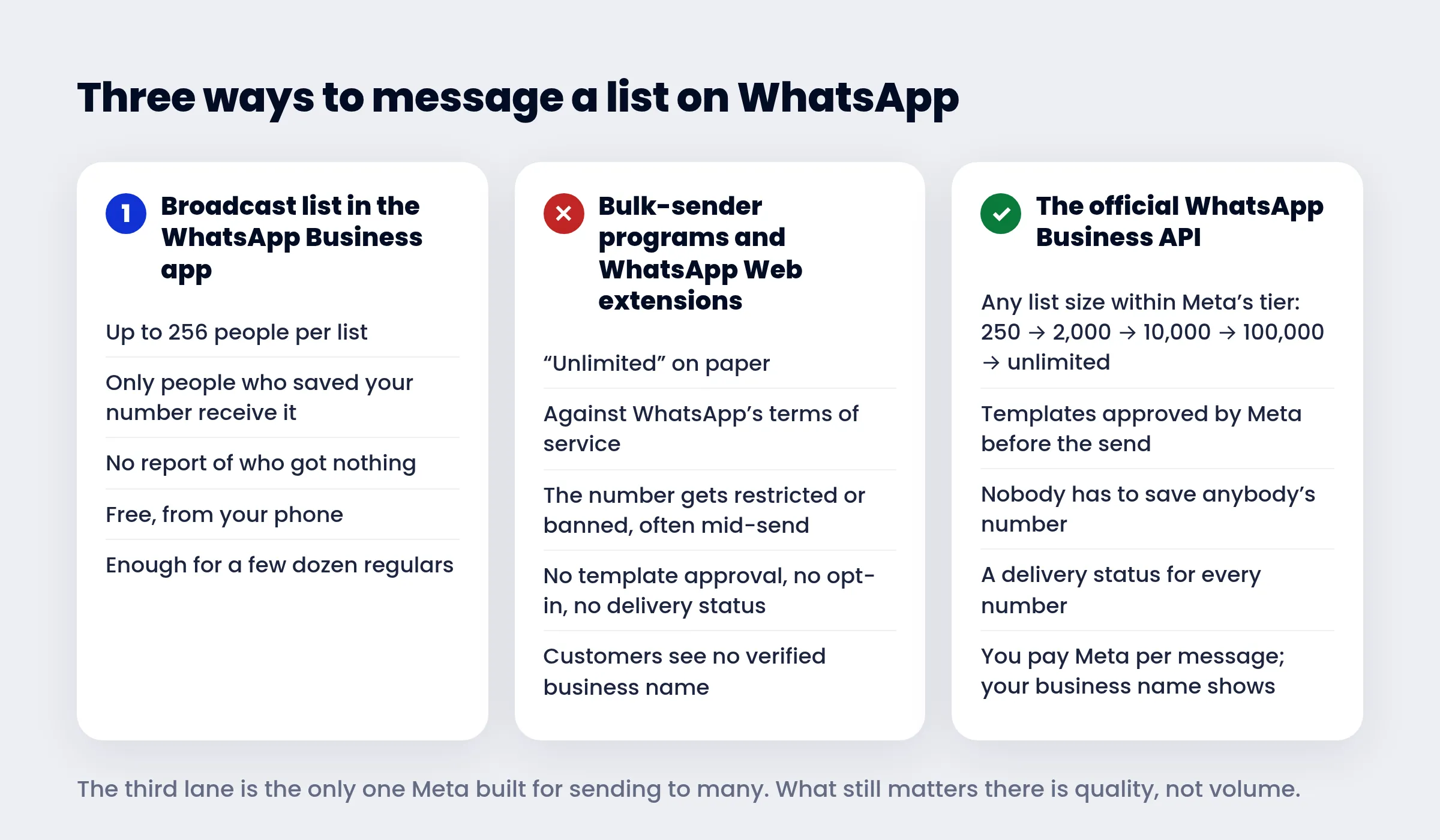
Broadcast lists in the WhatsApp Business app. The app lets you save a list and send to everyone in it at once. Two limits make it a tool for regulars, not for campaigns: a list holds up to 256 contacts, and a person receives the message only if they have your number saved in their phone. For a clinic writing to a few dozen regular patients, that is fine. For a list exported from a shop, most of whom never saved you, the message quietly reaches a fraction — and the app tells you nothing about who got nothing.
Bulk-sender programs, macros and WhatsApp Web extensions. These drive the ordinary app or WhatsApp Web from a script: paste the numbers, press send. WhatsApp's terms of service forbid bulk messaging, auto-messaging and auto-dialing outside its business platform, and its help center says plainly that accounts using unofficial apps can be restricted or banned. In practice the number sends a few hundred messages, people who did not expect them block and report it, and the number is restricted — often before the list is done, usually for good, with the chat history and the customers who trusted it. "Without a ban" in a tool's name is a promise the tool cannot keep, because the ban is decided by WhatsApp, not by the tool.
The official WhatsApp Business API. Your number joins Meta's business platform. The message you send first is a template Meta approves in advance; the list goes to Meta with each recipient's country code; every message comes back with a status — accepted, delivered, read, or failed with Meta's reason; and the customer sees your business name on the screen. Nobody has to save anybody's number. There is no ban for volume, because volume is what the platform is for. What Meta watches instead is quality: blocks, reports, and whether people read what you send. And Meta charges per message, which is the honest price of reaching people who did not write to you first. If the API is new to you, what WhatsApp Business API is explains it without the jargon.
| App broadcast list | Bulk-sender tools | Official API | |
|---|---|---|---|
| List size | 256 per list | "Unlimited" | 250 to unlimited unique recipients a day, by Meta's tier |
| Recipient must have you saved | Yes | No | No |
| Allowed by WhatsApp | Yes | No | Yes |
| Risk to the number | None | Restriction or ban | None for volume; quality is monitored |
| Delivery report per number | No | No | Yes, with Meta's reason for failures |
| Cost | Free | The program, then the number | Meta's per-message rate + a platform plan |
What "without a ban" really means on the API
The API cannot be banned for sending many messages. It can be restricted for sending badly. Three mechanisms decide that, and knowing them is the whole art of sending to thousands safely.
Messaging tiers. A new number may start conversations with 250 unique people in 24 hours. Meta raises it to 2,000, then 10,000, then 100,000, then unlimited, as you send to more people with a good quality rating — the step from 2,000 upwards happens automatically within hours when you used at least half your limit in the last week. Replies to customers who wrote to you do not count against the tier.
Quality rating. Every business number has a rating — green, yellow or red — that moves with blocks and reports from recipients. A red rating cuts the tier and can restrict the number; the API then returns error 131048, "restrictions on how many messages can be sent from this phone number". The protection is the same thing that makes a campaign work: send to people who agreed to hear from you, say something worth reading, and put a STOP line in every marketing template so a bored customer opts out instead of reporting you.
The per-person marketing limit. Meta caps how many marketing messages one person receives from all businesses combined, judged by that person's recent read rate and how full their inbox is. A message that hits the cap is simply not delivered — error 131049, "not delivered to maintain healthy ecosystem engagement" — and you are not charged for it. Meta's advice is to wait 24 hours before trying that person again. If the person replies to any of your messages, a 24-hour window opens and the limit no longer applies to them. In our data this single rule is the largest cause of undelivered campaign messages, as you will see below.
Step 1: prepare the sheet
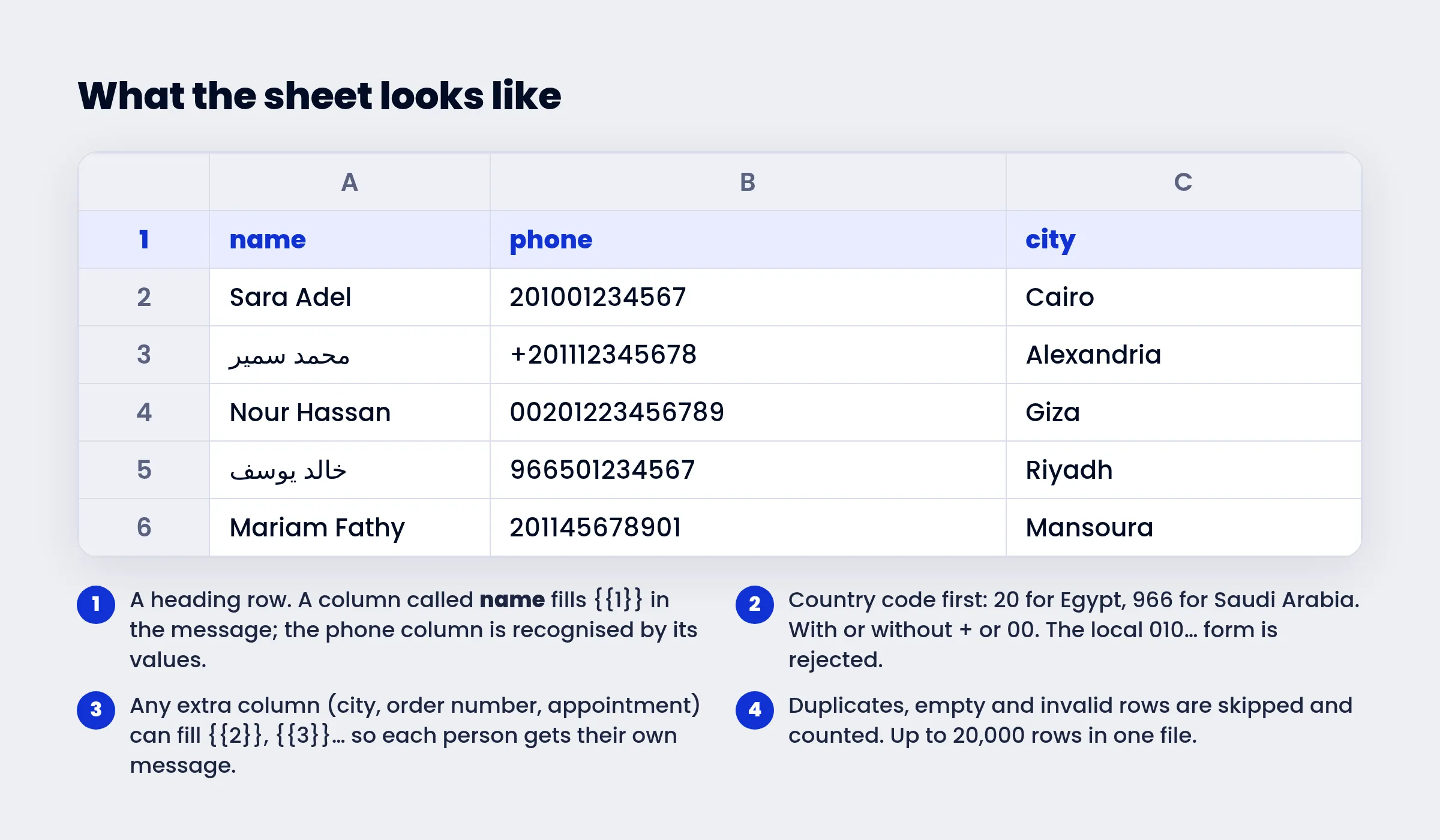
The file is an ordinary .xlsx with one row per person. The rules that matter:
- A heading row, with a column named name and a column holding the phone numbers. The phone column is recognised from its values; the name fills
{{1}}in the message. - Country code first. Egypt is 20 followed by the ten digits: 201001234567. Saudi Arabia is 966. A plus sign or a 00 in front is fine, spaces and dashes are tolerated, but the local 010… form is rejected — add the 20.
- Excel's number trap. A column of long numbers can show as 2.01E+11 or lose a leading zero. Format the column as Text before pasting, or keep the + in front; both are read correctly.
- Extra columns are welcome. City, order number, appointment time, balance: any column can fill
{{2}},{{3}}… in the template, so each person receives their own message, not a mass one. - Duplicates and invalid rows are skipped and counted when the file is read, so a number never receives a campaign twice. A single file can hold up to 20,000 rows.
Download the sample sheet (.xlsx)
The sample has the two columns, eight rows and the numbers in every accepted form. Replace the rows with yours and keep the headings.
Step 2: get a template approved
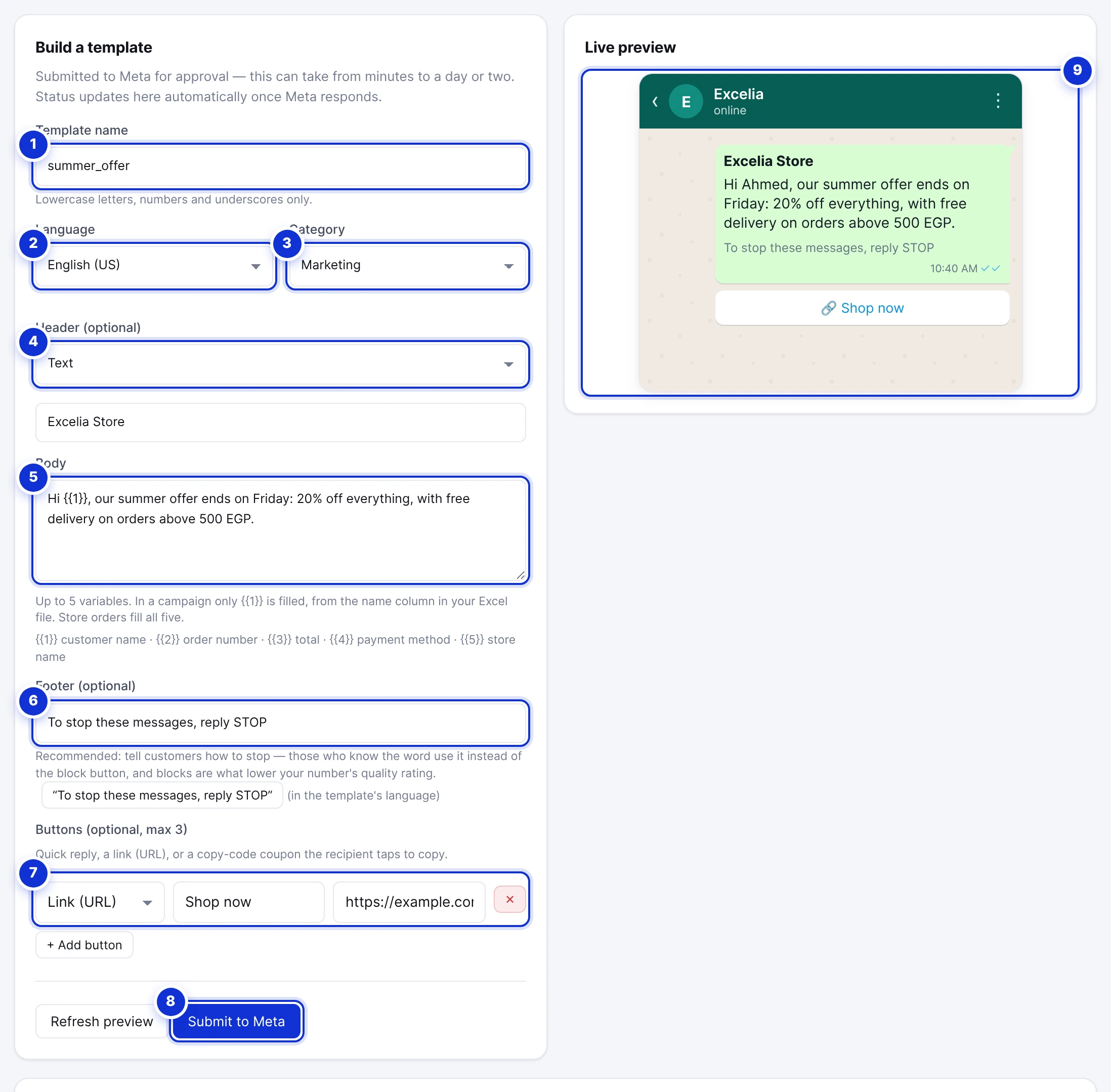
On WhatsApp, a business may write to a customer first — or after 24 hours of silence — only with a message Meta has approved in advance. That message is a template: fixed text with optional placeholders that are filled per recipient at send time. Campaigns send templates, nothing else, which is why "write anything and blast it" does not exist on the official platform.
What Meta looks at when it reviews one:
- The category. Marketing for offers and news; Utility for a message about an order, booking or account the person already has. Utility is cheaper, delivered more reliably, and not subject to the per-person marketing limit. Meta reclassifies a "utility" template that is really an offer.
- The language you declare must be the language of the text. An Arabic body filed under English is a rejection.
- Variables need examples. Every
{{1}}must come with a sample value, or Meta rejects the template without explanation. We learned this the hard way in July 2026, when every template a client submitted came back rejected until our builder started sending the examples automatically. A platform that leaves this to you will produce mysterious rejections. - A STOP line in the footer ("To stop these messages, reply STOP") is not required by Meta, but it is the cheapest insurance for your quality rating: a person who can say stop has no reason to report you.
Approval takes from a few minutes to a day or two; the status updates on its own and you get an email with the verdict. The full rules — names, headers, images, buttons and why templates get rejected — are in the templates guide.
Step 3: upload the list
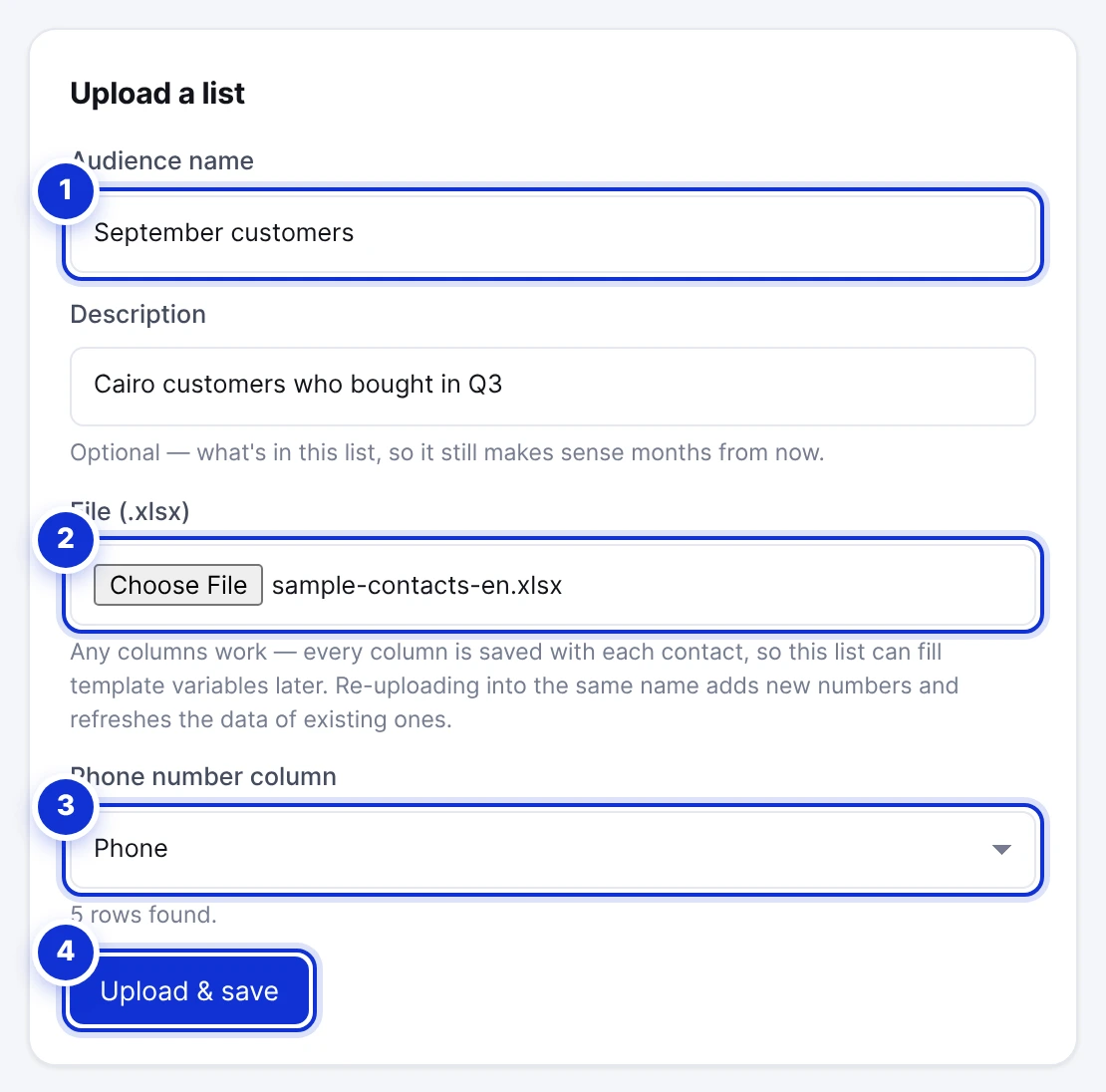
Open Campaigns → Audiences, give the list a name you will recognise months from now, and choose the file. The form reads it, shows how many rows it found and which column it took as the phone, and after Upload & save reports how many contacts were saved and how many were skipped as invalid or duplicate. Uploading a newer file under the same name adds the new numbers and refreshes the rest, so a monthly export from your shop keeps one audience current.
You can also skip the saving and attach a sheet to a single campaign at send time. Either way, the people who ever replied STOP to you are kept out automatically when the campaign is prepared. Details in Audiences.
Step 4: send
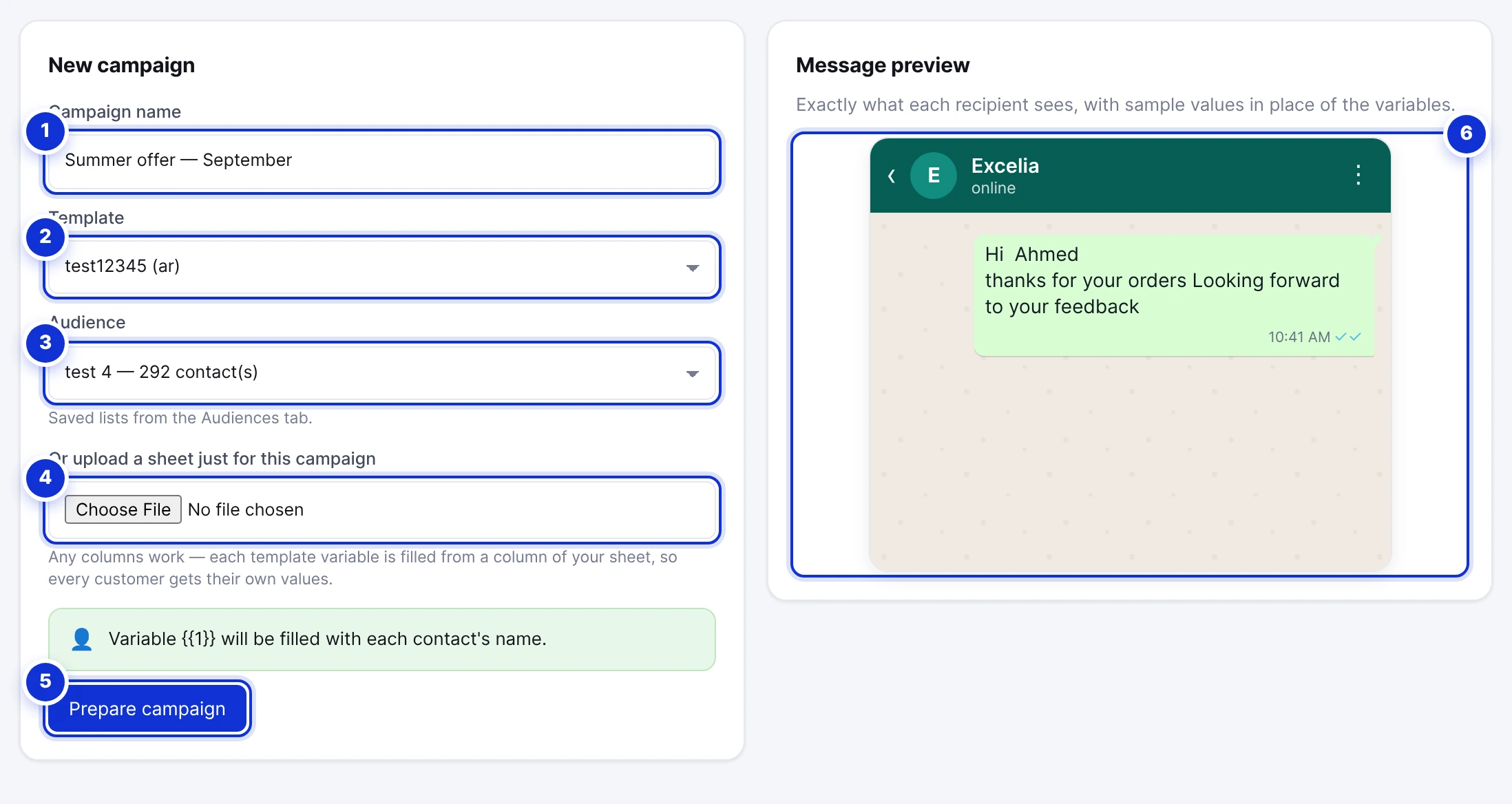
Campaigns → Send campaign: name the campaign, pick an approved template and the audience. If the template has variables, a mapping card asks which column fills each one, and the preview fills with the first row's real values so you see an actual message before anything is sent. Prepare campaign then checks the list — invalid numbers, duplicates, rows missing a mapped value and opted-out customers are removed and counted — and shows the final recipient count.
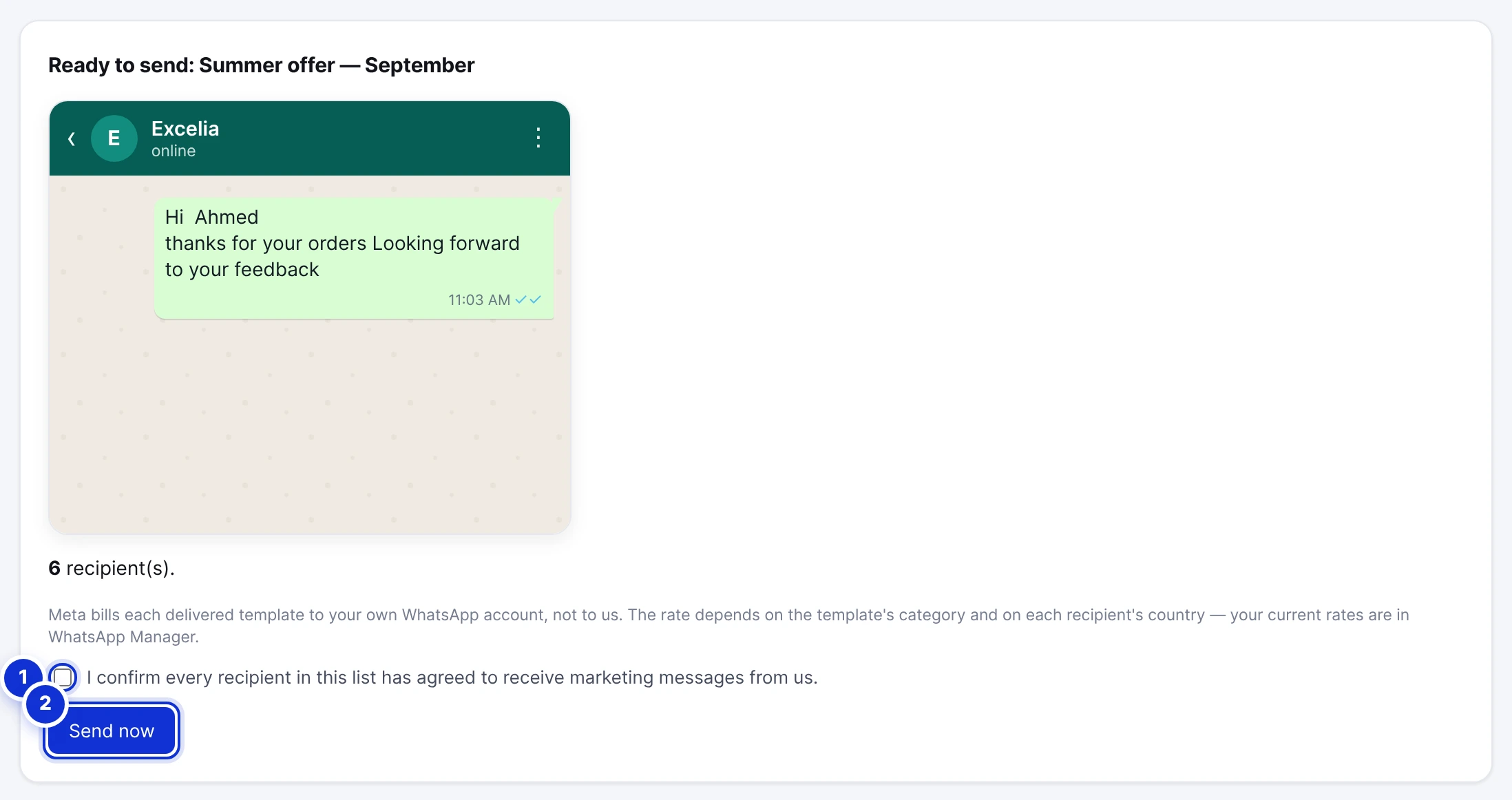
The last panel asks you to confirm that every recipient agreed to receive marketing messages from you, and reminds you that Meta bills each delivered template to your own WhatsApp account. Then Send now. Messages leave at about three a second — a list of 1,000 takes roughly six minutes — the History tab counts sent and failed live, and Pause stops the send at any moment with the unsent recipients unpaid. The two numbers at the top of the page, Meta's messaging tier and your plan's monthly allowance, are the ceilings of every send; the sending guide explains both.
Step 5: read the delivery report
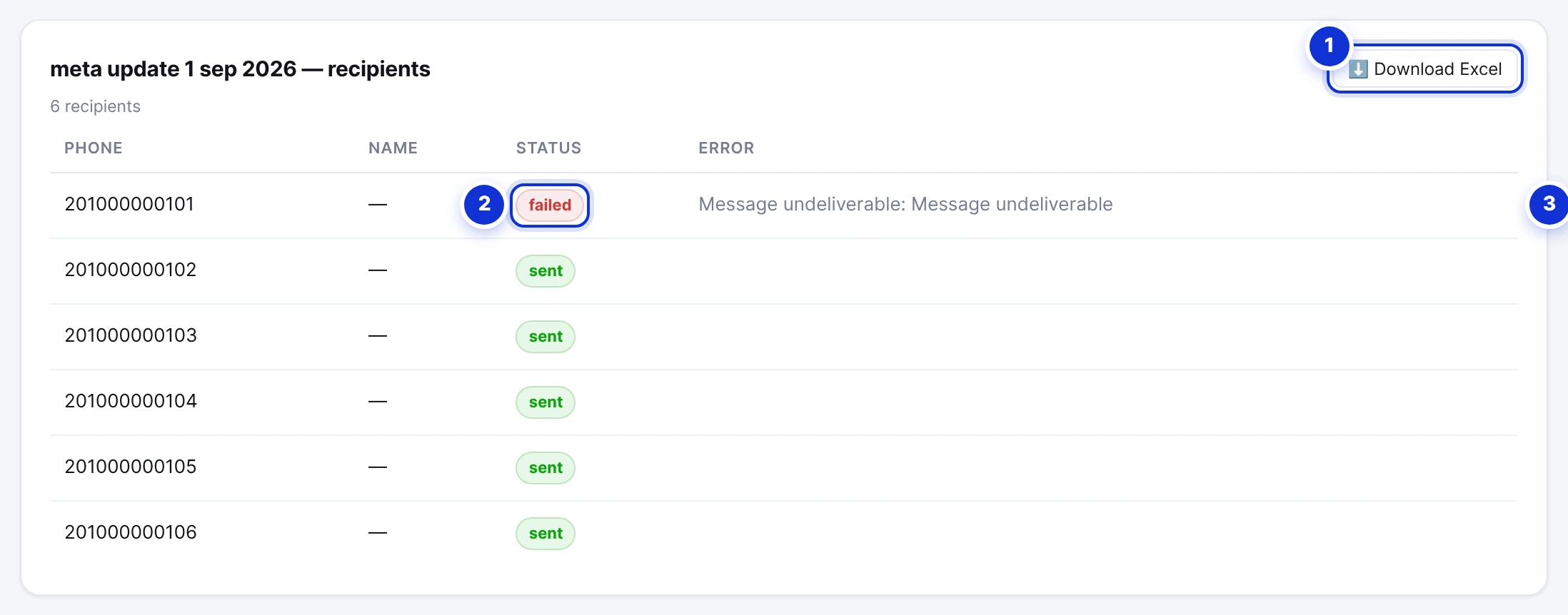
Sent means Meta accepted the message. Meta accepts messages for numbers it cannot deliver to as well, and reports the outcome a little later; when it does, the row flips to failed with the reason, and the campaign's totals are corrected. So the honest report is the one you read a few minutes after the send finishes, not the one that counts sends. The recipient list shows each number's status and Meta's reason, and downloads as Excel so you can clean your list for the next time — the people whose numbers are not on WhatsApp, in particular, should leave it. Replies land in your inbox like any message, with your campaign message at the top of the thread so your team sees what the customer is answering. More in Reports and delivery.
What it costs in Egypt
Two bills, from two parties.
Meta's bill is per delivered template and depends on the category and the recipient's country. For Egypt, Meta's published rate at the time of writing is about $0.0644 for a marketing message and $0.0036 for a utility message, plus 14% VAT — about 3.7 and 0.2 Egyptian pounds respectively at fifty pounds to the dollar. It is charged to the payment method on your Meta business account, which must exist before the first campaign: a campaign sent without one is accepted and then fails message by message, and we have the data to prove it below. Replies to people who wrote to you first are not templates and are free within the 24-hour window, up to 1,000 a month per number.
The platform's bill is the subscription. On ExceliaBOT’s campaigns it is one base plan plus a message tier:
| Campaign messages a month | Platform price |
|---|---|
| 250 | Free plan — no card, no end date |
| 1,000 | Base plan, 499 EGP ($9.99) |
| 3,000 | 1,899 EGP ($37.99) |
| 10,000 | 4,499 EGP ($89.99) |
| 25,000 | 8,499 EGP ($169.99) |
| 50,000 | 12,999 EGP ($259.99) |
| 100,000 | 20,499 EGP ($409.99) |
A worked example: 3,000 marketing messages to Egyptian numbers cost Meta's part — 3,000 × $0.0644 ≈ $193, about 11,000 EGP with VAT — plus the platform's 1,899 EGP. Meta's part is the big one, which is why the question to ask any provider is not the subscription price but whether it adds a margin on Meta's rate: some do, and independent comparisons of WhatsApp providers report margins of around 20% — on 3,000 messages that is more than the whole subscription. ExceliaBOT adds none — the message is billed by Meta to your own account at Meta's rate, and the pricing page says so.
What 10,000 real messages taught us about delivery
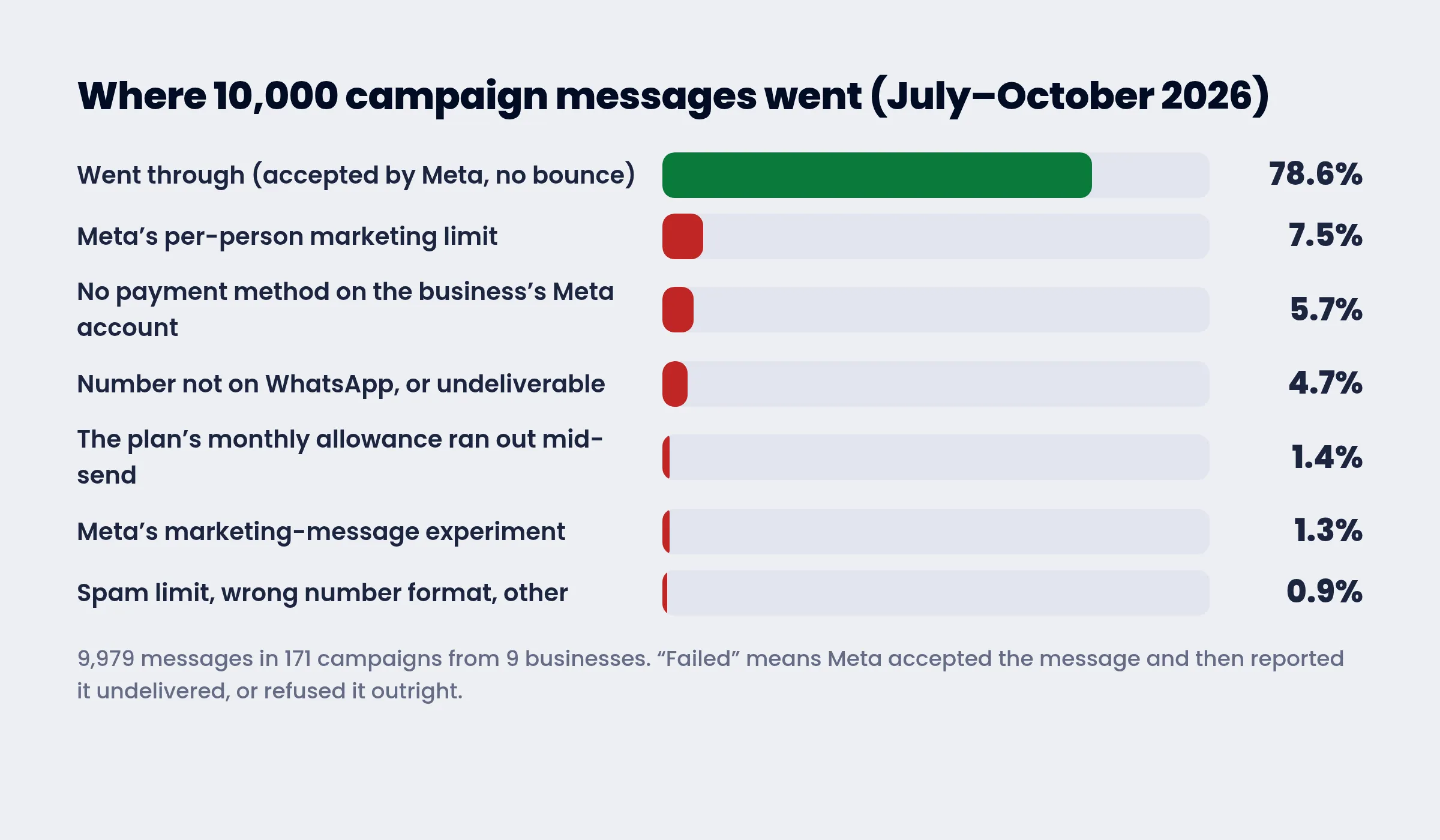
Between 17 July and 4 October 2026, nine businesses sent 171 campaigns through ExceliaBOT: 9,979 messages, all through the official API. 2,135 of them — 21.4% — did not go through. And 92% of those were accepted by Meta first and reported undelivered afterwards, which is exactly why a report that counts sends is worthless.
The causes, in order, with what to do about each:
- Meta's per-person marketing limit — 746 messages, 7.5% of everything sent (error 131049). The person had received enough marketing from businesses that week. Nothing was wrong with the number or the list; you are not charged. Do not resend for 24 hours. Over time, send to people who read and reply to you — a reply opens a 24-hour window where the limit does not apply — and use utility templates for anything that is not an offer.
- No payment method on the business's Meta account — 570 messages, 5.7% (error 131042). Four accounts' campaigns were accepted and then failed one by one. Add a card or a prepaid balance in WhatsApp Manager before the first send; it is the only cause on this list that is entirely avoidable.
- The number is not on WhatsApp, or cannot be delivered to — 467 messages, 4.7% (error 131026). Old numbers, landlines, people who left WhatsApp. Download the report and drop a number that fails this way twice.
- The plan's monthly allowance ran out mid-send — 139 messages, 1.4%. The remaining recipients are marked failed with that reason and can be sent later. Check the allowance against the list before pressing send.
- Meta's marketing-message experiment — 126 messages, 1.3% (error 130472). Meta withholds marketing messages from a sample of users to measure the effect. Nothing to do; it is not about you.
- Spam limit, wrong number format and other refusals — 87 messages, 0.9%, including 43 hits of the quality restriction (131048) on one number that had sent to a list that did not expect it.
The spread between campaigns is the real lesson. Of the 57 campaigns with at least 50 recipients, eight lost 5% or less, fourteen lost between 5% and 15%, twenty-six lost between 15% and 30%, and nine lost more than 30%. Same platform, same API, same country. The difference was the list: who was on it, whether they had asked to be, and whether the number had sent to them before.
Five rules that keep a number healthy
- Only people who agreed. A customer who bought from you, booked with you or ticked a box. Not a list someone sold you — that is where the 30%-loss campaigns came from.
- A STOP line in every marketing template, and honour it. Opt-outs cost you nothing; reports cost you the tier.
- Warm the number. Start a new number with a few hundred of your best customers, not the whole list on day one; the tier rises on its own within days.
- Utility for transactions, marketing for offers. An order update sent as a marketing template costs eighteen times more and risks the per-person cap.
- Read the report and clean the list. Remove numbers that are not on WhatsApp; wait a day for the 131049 ones; never resend a whole failed campaign blindly.
Questions people ask
Can I send WhatsApp messages from Excel without saving the numbers?
Yes. On the API the list is the sheet; your phone's contacts are never involved, and the recipient does not need to have your number either.
Can I send from a computer?
Yes — the dashboard is a website, and the campaign runs from the server, not from your phone. The number keeps working in the WhatsApp Business app on the phone alongside the platform.
Is it free?
The platform has a free plan with 250 campaign messages a month, enough to test. Meta's per-message price is never free for marketing templates; it is paid on your Meta account whichever provider you use.
How many messages can I send a day?
Meta's tier for your number: 250 unique recipients in 24 hours for a new number, rising to 2,000, 10,000, 100,000 and unlimited with good quality. Replies to people who wrote to you are not counted.
Why do "unlimited, no ban" programs exist, then?
Because the ban comes after the purchase. The program sends from the ordinary app against WhatsApp's terms; when the number is restricted the seller has moved on.
Can each message carry the person's name or order?
Yes. {{1}} takes the name column; {{2}} and up take any column of your sheet, so every recipient gets their own message.
Can I message people who never wrote to me?
On the API, yes — that is what templates are for — provided they agreed to hear from you. Without consent you can technically send, and you will pay for it in blocks, reports and the tier.
Does the customer need to have my number saved?
For the app's broadcast lists, yes. On the API, no — the message arrives from your verified business name whether or not they saved you.
Sources: WhatsApp's help center on broadcast lists and unofficial apps; WhatsApp's terms of service; Meta's documentation on messaging limits, per-user marketing template message limits, error codes and pricing; ExceliaBOT campaign delivery data, 17 July to 4 October 2026, aggregated across nine accounts. Rates are Meta's published rates for Egypt at the time of writing and may change.