
Campaign reports and delivery
Reading the History tab, what sent and failed really mean, every failure reason explained, the recipient list with its Excel export, and the one-page PDF report you can hand to a client or a manager.
#The History tab
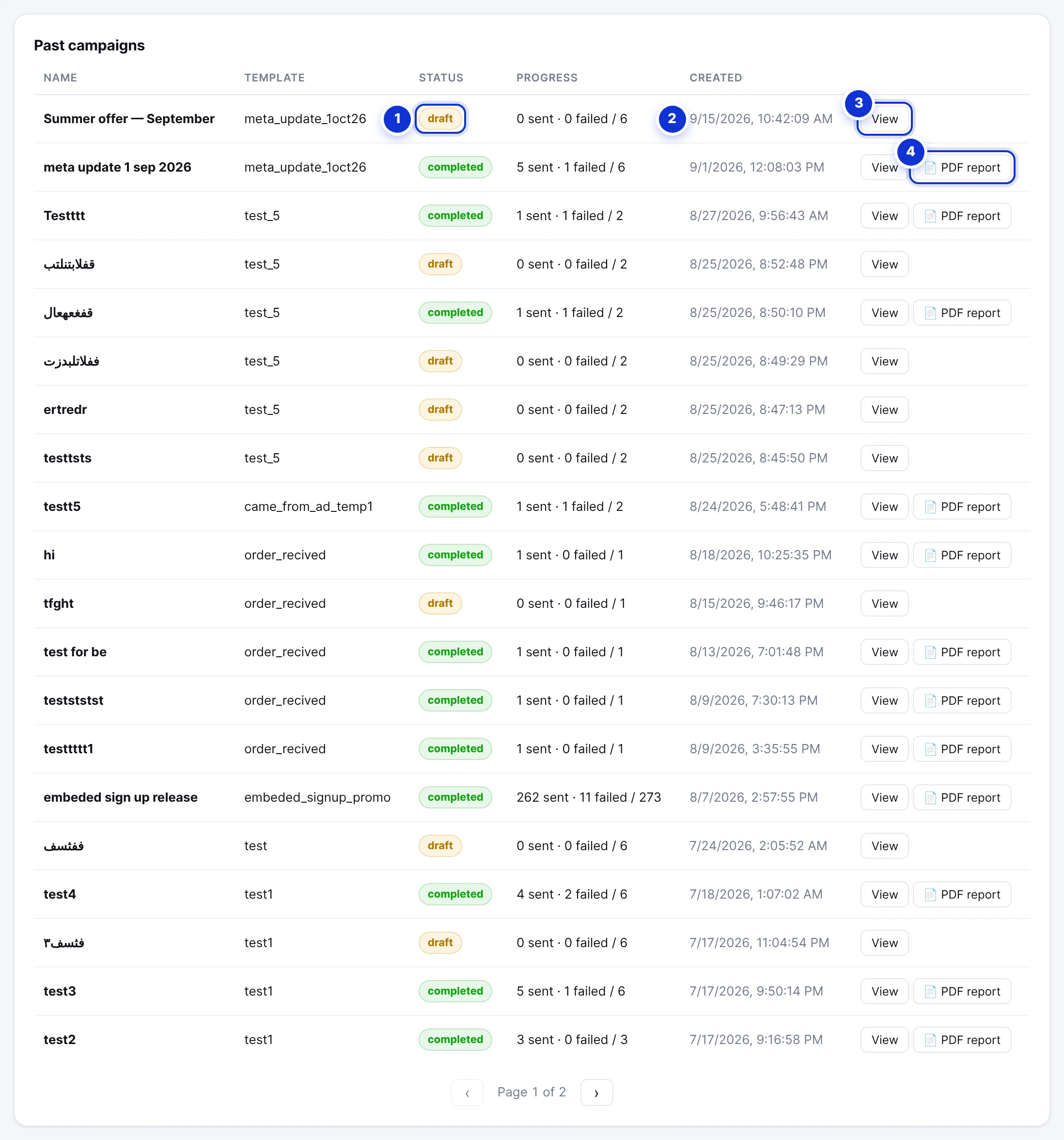
- 1Status: draft, sending, paused, completed or failed.
- 2Progress — sent · failed / total. It updates live while a campaign sends.
- 3View — opens the recipient list below.
- 4PDF report — for completed campaigns.
| Status | Meaning |
|---|---|
| draft | Prepared, never sent. Costs nothing; stays as a record. |
| sending | Going out now, about three messages a second. |
| paused | Stopped by you; unsent recipients stay pending. |
| completed | Every recipient was attempted. Sent and failed add up to the total. |
| failed | The campaign could not run at all — for example the template was deleted or WhatsApp disconnected. The reason is on the row. |
#What “sent” means — and what it does not
A recipient is marked sent the moment Meta *accepts* the message. Meta accepts messages for numbers it cannot deliver to as well, and reports the outcome a little later. When that report says the message could not be delivered, the row flips to failed with the reason, and the campaign’s counts are corrected — so a campaign’s numbers can still change for a few minutes after it completes.
Replies to a campaign land in the inbox like any other message. The recipient’s thread opens with your campaign message at the top, so the assistant and your team see what the customer is answering.
#The recipient list
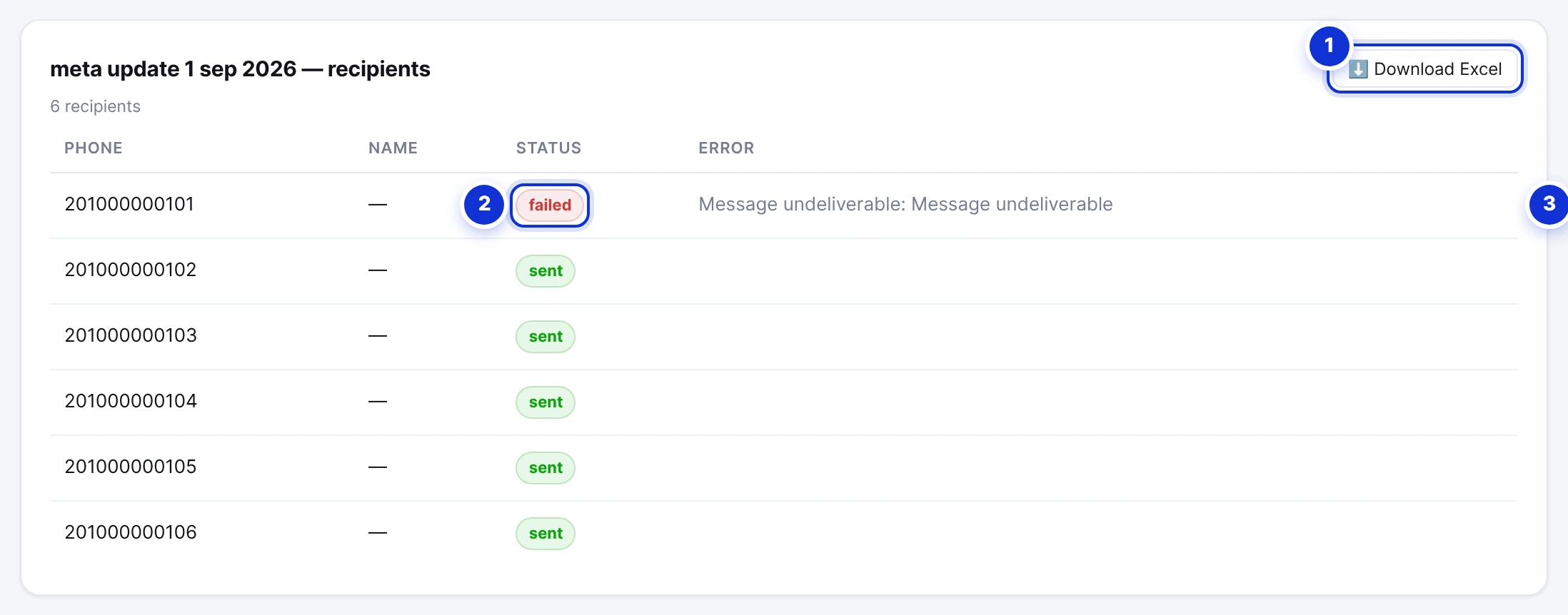
- 1Download Excel — every recipient with status, reason and the values that filled the message.
- 2The status of each recipient.
- 3The reason, for failed ones.
Press View on a campaign to list every recipient: the number, the name or the spreadsheet columns that filled the message (under the headings you typed), the status and — for failures — Meta’s reason. Download Excel gives the same list as a file, with the sheet’s headings in the language your dashboard is set to.
#Failure reasons explained
Meta reports failures with a code and a sentence. The ones you will actually meet:
| What Meta says | Code | What it means | What to do |
|---|---|---|---|
| Message not delivered to maintain healthy ecosystem engagement | 131049 | Meta held the marketing message back because this person has received many marketing messages lately — from all businesses, not only yours. Not a quality problem on your side. | Nothing; these numbers usually receive the next campaign. Utility templates are not subject to this. |
| Message undeliverable | 131026 | The number is not on WhatsApp, was mistyped, or cannot receive messages. | Remove it from future lists. |
| Re-engagement message | 131047 | More than 24 hours since the customer last wrote; only a template may be sent. Seen when a follow-up or order message was not an approved template. | Use an approved template. |
| Rate limit hit / pair rate limit hit | 130429 · 131056 | Too many messages in a short time, or too many to the same number. | Wait; the sender already paces itself. Avoid sending the same person several campaigns in a day. |
| Spam rate limit hit | 131048 | Too many recent messages from your number were reported or blocked; Meta throttles it. | Pause marketing for a day or two, review consent, add the STOP line. |
| User’s number is part of an experiment | 130472 | Meta withholds marketing messages from a small sample of users for measurement. | Nothing — a Meta decision. |
| opted out — the customer asked not to receive marketing messages | — | They sent STOP after the list was prepared. | Nothing; they are skipped until they send START. |
| monthly campaign quota exhausted | — | Your plan’s campaign messages for the period ran out during the send. | Request an upgrade, or wait for the period to renew. |
#The PDF report
For every completed campaign, PDF report builds a one-page, branded A4 report in your dashboard’s language: the campaign, its date and duration, total, delivered and undelivered with a percentage, the undelivered messages grouped into the reasons above with a plain-language explanation of each, how many recipients replied, and recommendations for the next campaign. It is written to be handed to a client or a manager as is.
See a sample: English report · Arabic report.
#Reading the numbers
- Delivery rate above 90% is normal for a list of real customers. Lower means old numbers or a list that was not opted in.
- Frequency caps (131049) rise and fall with what other businesses send; a Utility template for transactional messages avoids them entirely.
- Replies are the number that matters: a campaign that 5% of recipients answer is doing well. Build your next audience from the repliers with Auto-create from your own data → Everyone who messaged you since the campaign date.
Can I resend to the ones that failed?
Why does the report say delivered when a customer says nothing arrived?
Where are read receipts?
Write to us and a real person answers — usually the same working day. [email protected]
Or message your account manager from the My Manager page in the dashboard.