
Automatic follow-ups
A customer asked, engaged, then went quiet. A flow waits the hours you choose and sends your follow-up template on its own — free while Meta’s ad window is open, never to someone who already replied.
#What a flow is
A flow is a rule you write once: who enters it, how long of silence to wait, and which template to send. From then on it runs per customer, on its own. Someone who writes back leaves the flow at once — a follow-up is never sent to a customer who already replied. Every follow-up is an approved template, sent through the same channel as a campaign, and counted against the same monthly quota.
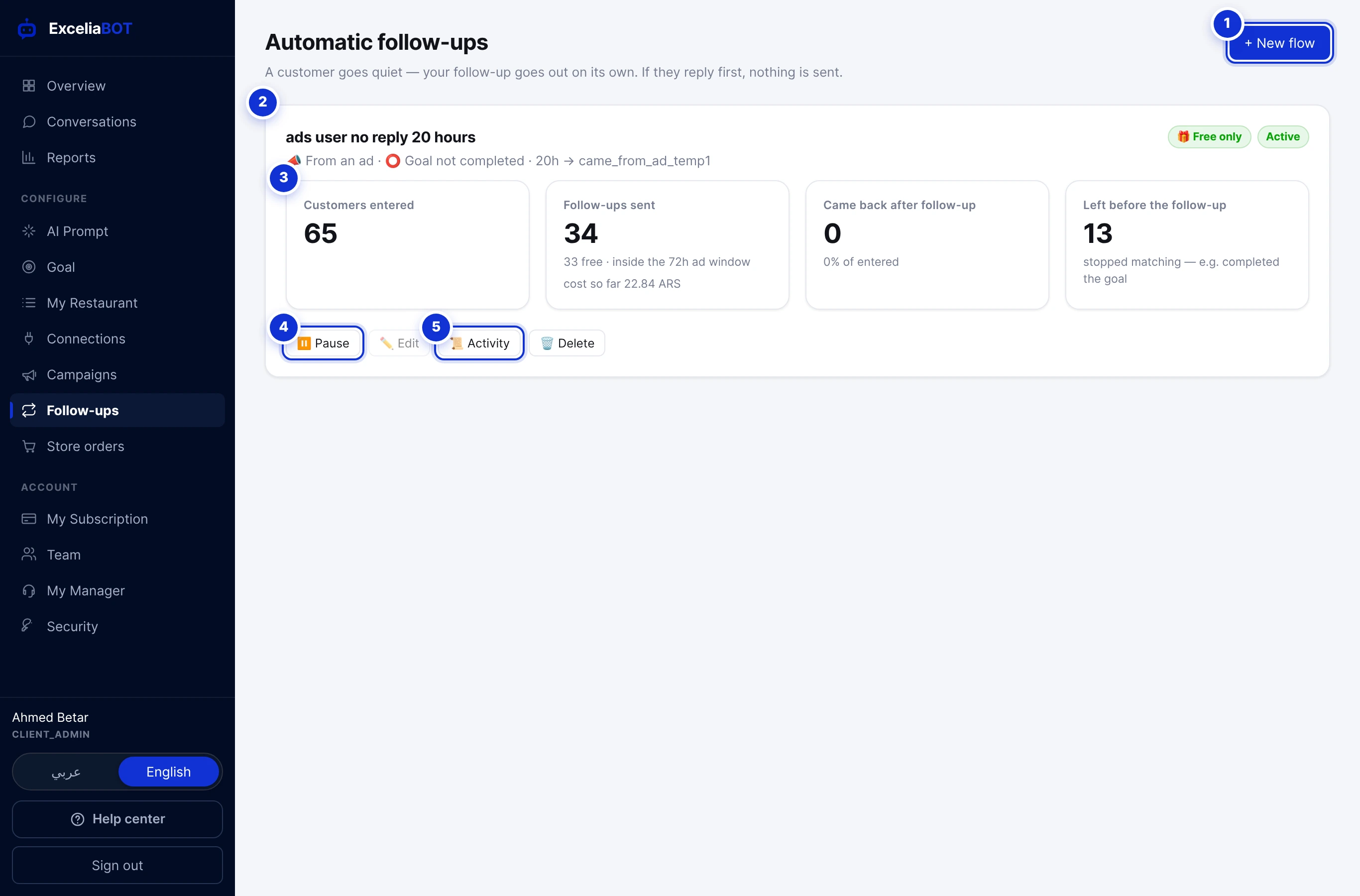
- 1New flow.
- 2A flow: its name, who enters it and the sequence in one line, and whether it is active or paused.
- 3Its results: customers entered, follow-ups sent (how many were free), how many came back, and how many left before the follow-up because they stopped matching — for example by completing the goal.
- 4Pause / Activate. A flow must be paused before it can be edited.
- 5Activity — every customer in the flow and where they stand.
#Building a flow
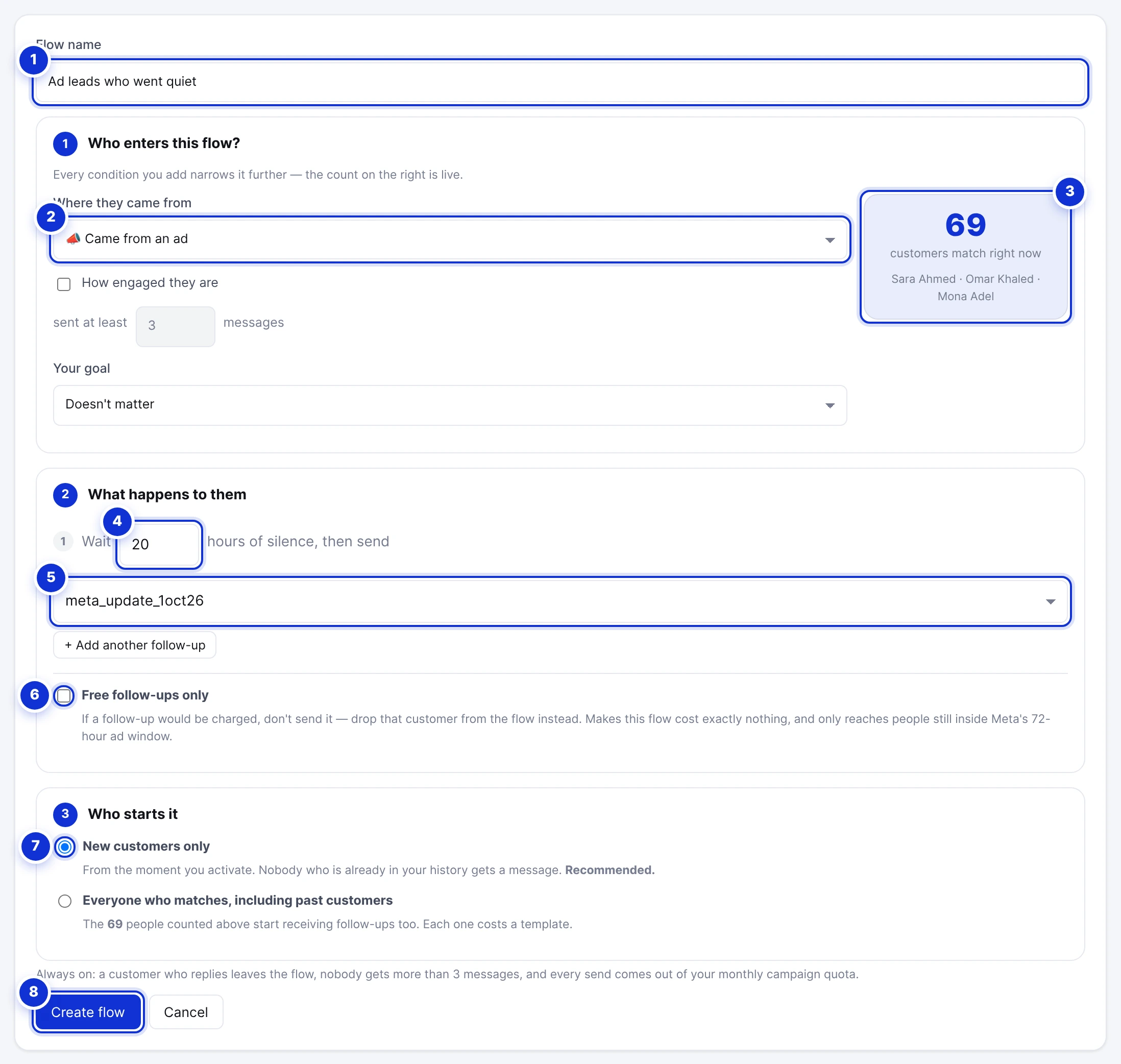
- 1A name.
- 2Where they came from: everyone, only ad-click customers, or only organic ones.
- 3A live count of how many customers match the conditions right now.
- 4Hours of silence to wait before the step.
- 5The template to send — approved templates only.
- 6Free follow-ups only.
- 7Who starts it: new customers only, or everyone who matches including past customers.
- 8Create flow.
- Press New flow (you need at least one approved template first) and name it.
- Who enters? Narrow it with the conditions: where the customer came from (an ad, organic, anyone), how engaged they are (at least N messages), and whether they completed your goal. The count on the right updates as you change them.
- What happens to them: wait N hours of silence, then send a template. Add up to three steps — a second and third follow-up, each after its own wait.
- Decide whether the flow is free only (below) and who starts it: *New customers only* is the safe default — nobody already in your history is touched. *Everyone who matches, including past customers* sends to the people counted above too, each one costing a template.
- Press Create flow. It is saved paused; press Activate when you are ready and confirm.
The flow most businesses want: *customers from ads who sent 3+ messages and never completed the goal · wait 20 hours → reminder template*. They asked, they engaged, they disappeared — 20 hours later they get a nudge, free while Meta’s 72-hour ad window is open.
#Rules that are always on
- Silence means silence. “Wait 20 hours” counts from the customer’s *last* message; a customer who keeps writing keeps pushing the follow-up away.
- A reply ends it. The moment the customer writes back, they leave the flow. No further steps are sent.
- Three messages at most per customer per flow, whatever the steps say.
- Stopped matching, stopped sending. A customer who no longer meets the conditions — for example they completed the goal — leaves the flow before the follow-up.
- Opted out means skipped. A customer who sent STOP never receives a follow-up; the log says so.
- Quota. Every send comes out of your monthly campaign quota; when it is used up, sends wait.
#Free follow-ups and the 72-hour window
A conversation that started from a click-to-WhatsApp ad is free to message — templates included — for 72 hours. Tick Free follow-ups only and the flow sends a follow-up only while that is true; a customer whose follow-up would be charged is dropped from the flow instead of costing anything. The flow’s card counts free and charged sends separately, and the page shows what all your follow-ups cost this cycle at Meta’s own rate.
#The activity log
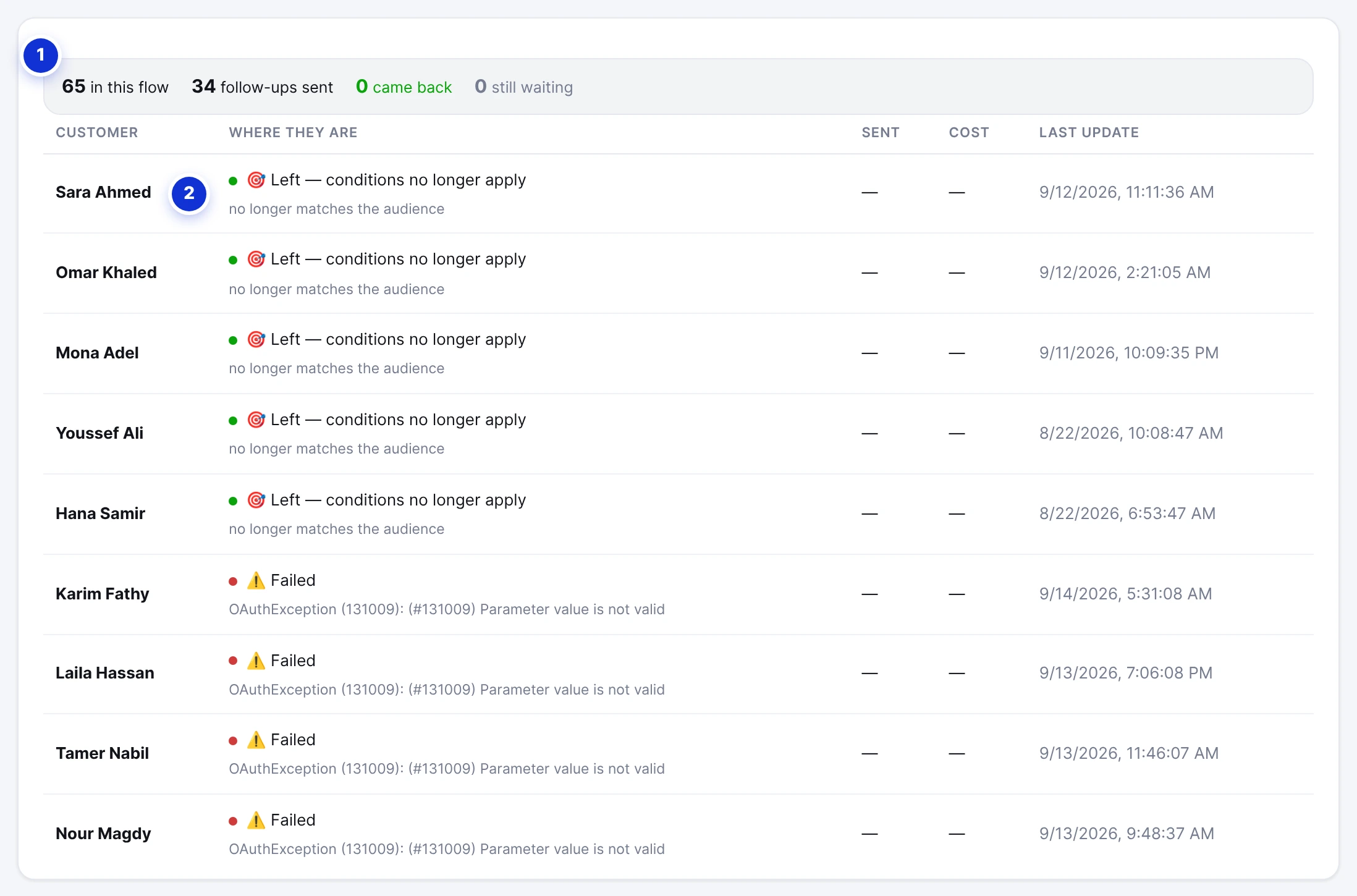
- 1The totals: in the flow, follow-ups sent, came back, still waiting.
- 2Where each customer stands.
| State | Meaning |
|---|---|
| Waiting | Enrolled; the silence timer is running. The row shows when the follow-up is due. |
| Sent · awaiting reply | The follow-up went out; nothing back yet. |
| Came back | The customer replied after the follow-up — the outcome the flow exists for. |
| Left — conditions no longer apply | They stopped matching before the send — usually because they converted. |
| Follow-up finished | Every step was sent; no reply. |
| Skipped — would have cost money | Free-only flow, and the 72-hour window had closed. |
| Skipped — the customer opted out | They sent STOP. |
| Reached the cap | Three messages were sent to this customer. |
| Failed | Meta refused the send; the reason is under the state. |
#Pausing, editing, deleting
- Pause stops all pending follow-ups immediately. Customers keep their place; activating again resumes.
- Edit is available only while paused — changing the steps under customers who are part-way through would renumber their sequence.
- Delete removes the flow and its history. Customers part-way through simply stop receiving follow-ups; nothing is sent to them.
Does a follow-up go to Messenger or Instagram customers?
What if the customer replies to the follow-up with a question?
Why did nobody enter my flow?
Write to us and a real person answers — usually the same working day. [email protected]
Or message your account manager from the My Manager page in the dashboard.