
STOP: letting customers opt out
A customer who replies STOP is taken off your marketing list automatically. Why that protects your number, exactly which words count, what the customer sees, and how someone comes back.
#Why you want customers to be able to say stop
A customer who does not want your offers has two options: reply *stop*, or press block and report in WhatsApp. Blocks and reports are what lower your number’s quality rating, and a low rating shrinks how many people you may message. So a clear, working way out is not a loss of a customer — it is the thing that keeps your number healthy for everyone else.
The opt-out keyword is on for every account. You can switch it off on Campaigns → Settings if your business genuinely uses these words in conversation, but we recommend leaving it on.
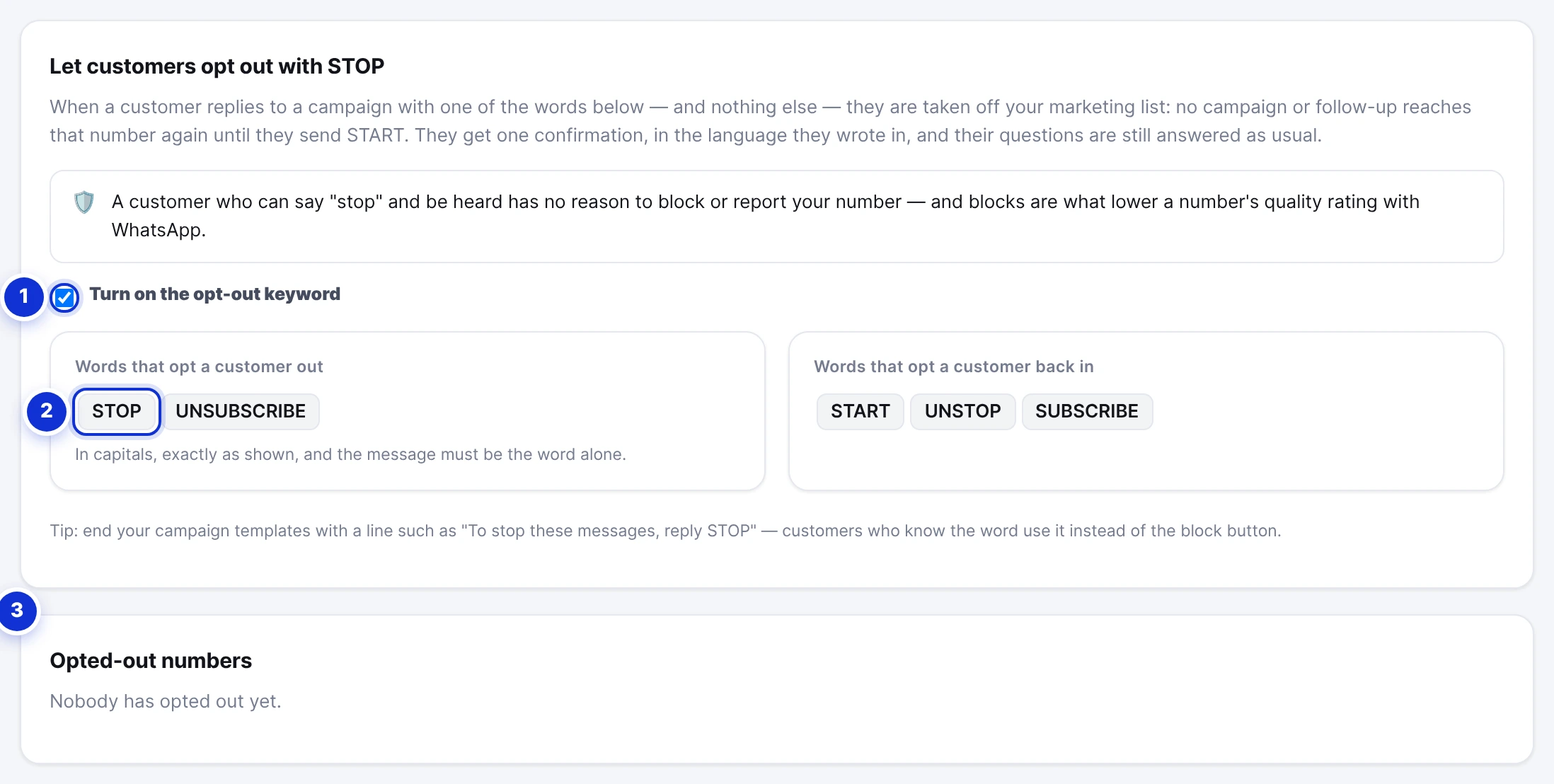
- 1The switch.
- 2The words that opt a customer out, and the words that bring them back.
- 3The numbers that opted out, with what they sent and when.
#Exactly which words count
| Customer sends | Effect |
|---|---|
STOP or UNSUBSCRIBE | Opted out. No campaign or follow-up reaches the number again. |
START, UNSTOP or SUBSCRIBE | Opted back in. Campaigns and follow-ups resume. |
- The word must be in capital letters, exactly as shown, and it must be the whole message — “STOP” counts; “stop”, “Stop please” and “please STOP the messages” do not. Punctuation and emoji around it are ignored.
- Only Latin words are recognised — there are no Arabic keywords, on purpose: an Arabic word for “stop” appears in ordinary conversations far too often to be a safe switch.
- It applies to WhatsApp only, and only while the switch is on.
#What the customer experiences
- They reply STOP to one of your messages.
- They receive one short confirmation, in the language they wrote in, saying they will no longer receive marketing messages and that START brings them back.
- Their questions are still answered as usual — opting out silences campaigns and follow-ups, not the conversation.
In your inbox their thread carries an Opted out chip, and the Settings tab lists the number with the word they sent and the date.
#What it changes in your account
- When a campaign is prepared, opted-out numbers in the audience are skipped and counted in the summary.
- If someone opts out while a campaign is sending, their message is not sent and their row says why.
- Automatic follow-ups skip them; the activity log shows *Skipped — the customer opted out*.
- They stay in your audiences and conversations; nothing is deleted.
#Coming back
Only the customer can put themselves back, by sending START, UNSTOP or SUBSCRIBE. There is no button in the dashboard to override their choice — by design, since a number that asked to be left alone and was messaged anyway is exactly what gets reported.
Add the ready-made footer to every marketing template — “To stop these messages, reply STOP” — from the Templates tab. Customers who know the word use it instead of the block button.
A customer wrote “stop” in lowercase and still gets campaigns.
Does STOP stop store-order messages too?
Can I see who opted out?
Write to us and a real person answers — usually the same working day. [email protected]
Or message your account manager from the My Manager page in the dashboard.