A WhatsApp assistant that replies by itself is half the job. The other half is knowing what it said, stepping in when a customer needs a person, and changing its instructions when your prices or hours change. Most business owners do that half from their phone, between two other jobs.
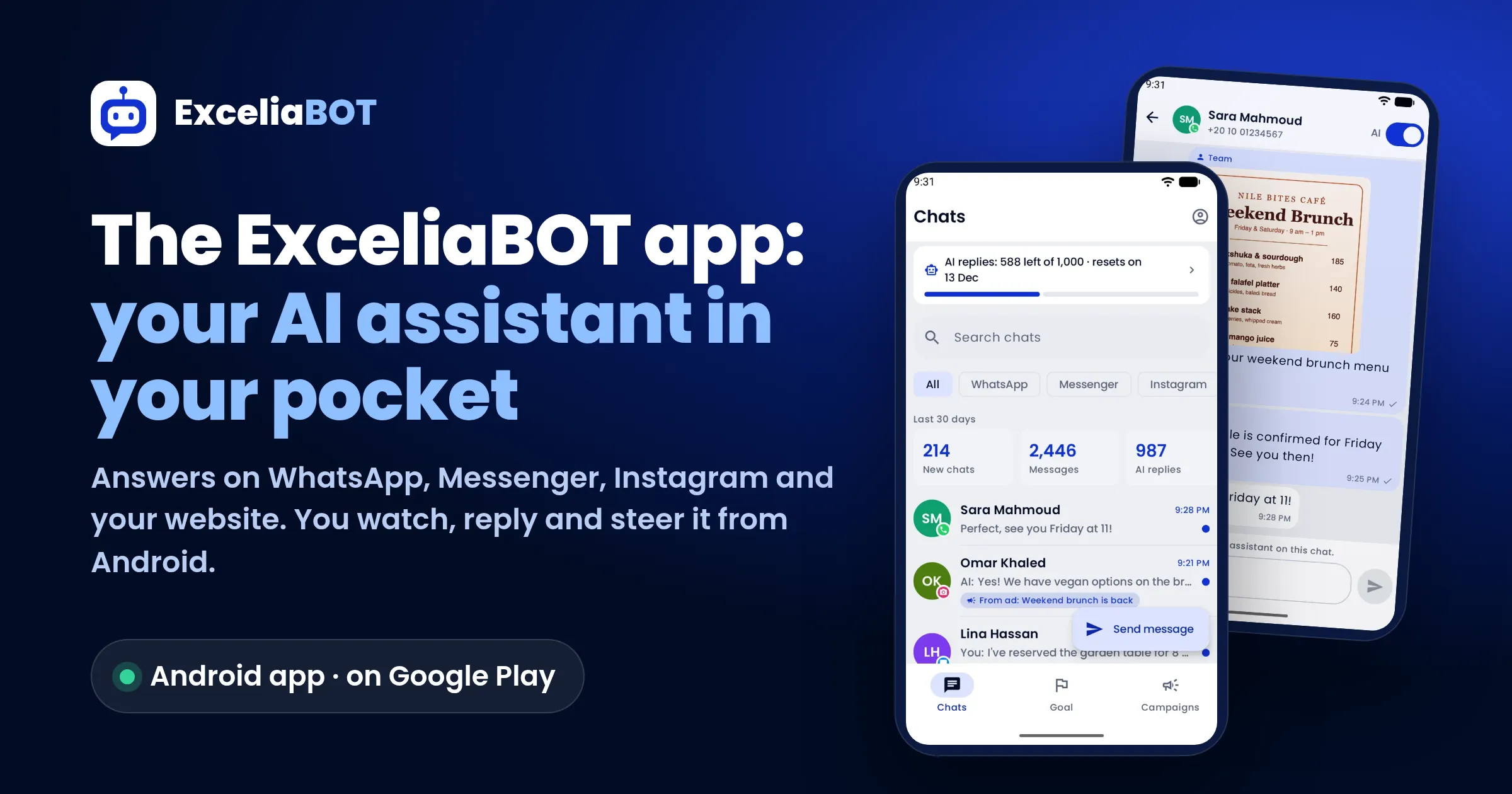
That is what the ExceliaBOT app is for. It runs on Android and is on Google Play. It is not a second WhatsApp. It is your remote control for the AI assistant that answers your customers on WhatsApp, Messenger, Instagram and your website chat.
In short
- Set up from the phone: connect a channel, describe your business or add a file, and the AI writes the assistant's instructions in under a minute.
- One inbox: WhatsApp, Messenger and Instagram chats together. You can reply yourself at any time, and the assistant steps aside on that chat.
- Instant alerts: every new customer message rings your phone. In the last 30 days the app delivered 16,110 notifications to business owners' phones.
- More than chats: send a template after the 24-hour window, follow the leads the assistant collected, read campaign results, write new templates, and edit the instructions with every version kept.
- Free to try: 14 days or 500 AI replies, whichever comes first. If you already pay on the website, you sign in at no extra cost.
What is the ExceliaBOT app?
The ExceliaBOT app is the phone side of an ExceliaBOT account. The assistant itself runs on our servers through the official WhatsApp API from Meta, so it keeps answering when your phone is off or out of battery. The app is where you watch it and steer it.
Most people who search for a "WhatsApp auto reply app" find one of two things:
| What you find | What it does | Where it stops |
|---|---|---|
| The away message in WhatsApp Business | One fixed greeting or "we're closed" text. | It answers no actual question. |
| "Auto reply" apps that read your notifications | They tap reply on your phone when a message notification appears. | They need your phone on and online, they break WhatsApp's terms, and they put the number at risk. |
| The ExceliaBOT app | It controls an AI assistant that runs on the official API and reads your menu, prices and files. | It doesn't depend on your phone, and you can take over any chat. |
Since the app reached Google Play on 8 October 2026, 38 phones on 34 business accounts have connected to it, not counting our own.
Set up the assistant from your phone in three steps
You can create the account in the app itself: business name, business type, your name, email, phone and a password. You confirm the email, and setup takes three steps.
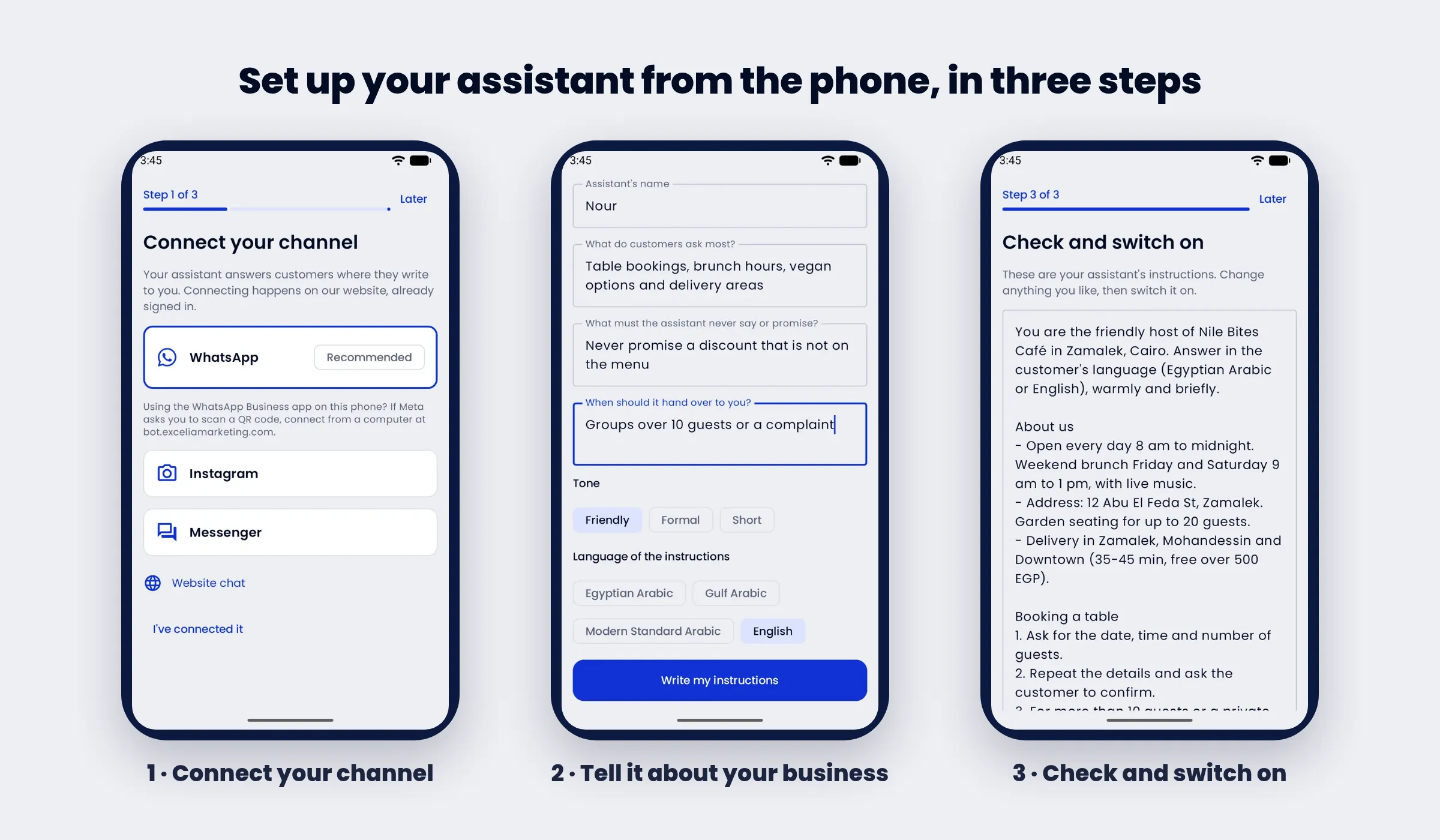
- Connect your channel. Choose WhatsApp, Instagram, Messenger or the website chat. The connection happens in Meta's own window on our website, and the app opens it already signed in. If you use the WhatsApp Business app on the same phone and Meta asks you to scan a QR code, connect from a computer at bot.exceliamarketing.com, then come back.
- Tell it about your business. Take a photo of the menu or price list with the camera, or add up to three files (PDF, picture, text or CSV), plus your website. Then answer a few short questions: the assistant's name, what customers ask most, what it must never say or promise, and when it should hand over to you. Pick a tone (friendly, formal or short) and a language (Egyptian, Gulf, Modern Standard Arabic or English).
- Check and switch on. The AI reads your files and website and writes the instructions in under a minute. Read them, change what you like, and switch the assistant on.
Every chat in one inbox, with you in control
The Chats tab puts WhatsApp, Messenger and Instagram in one list, with a filter for each. The top of the screen shows how many AI replies are left this month and the last 30 days at a glance: new chats, messages and AI replies. A chat that came from an ad carries a tag with the ad's name.
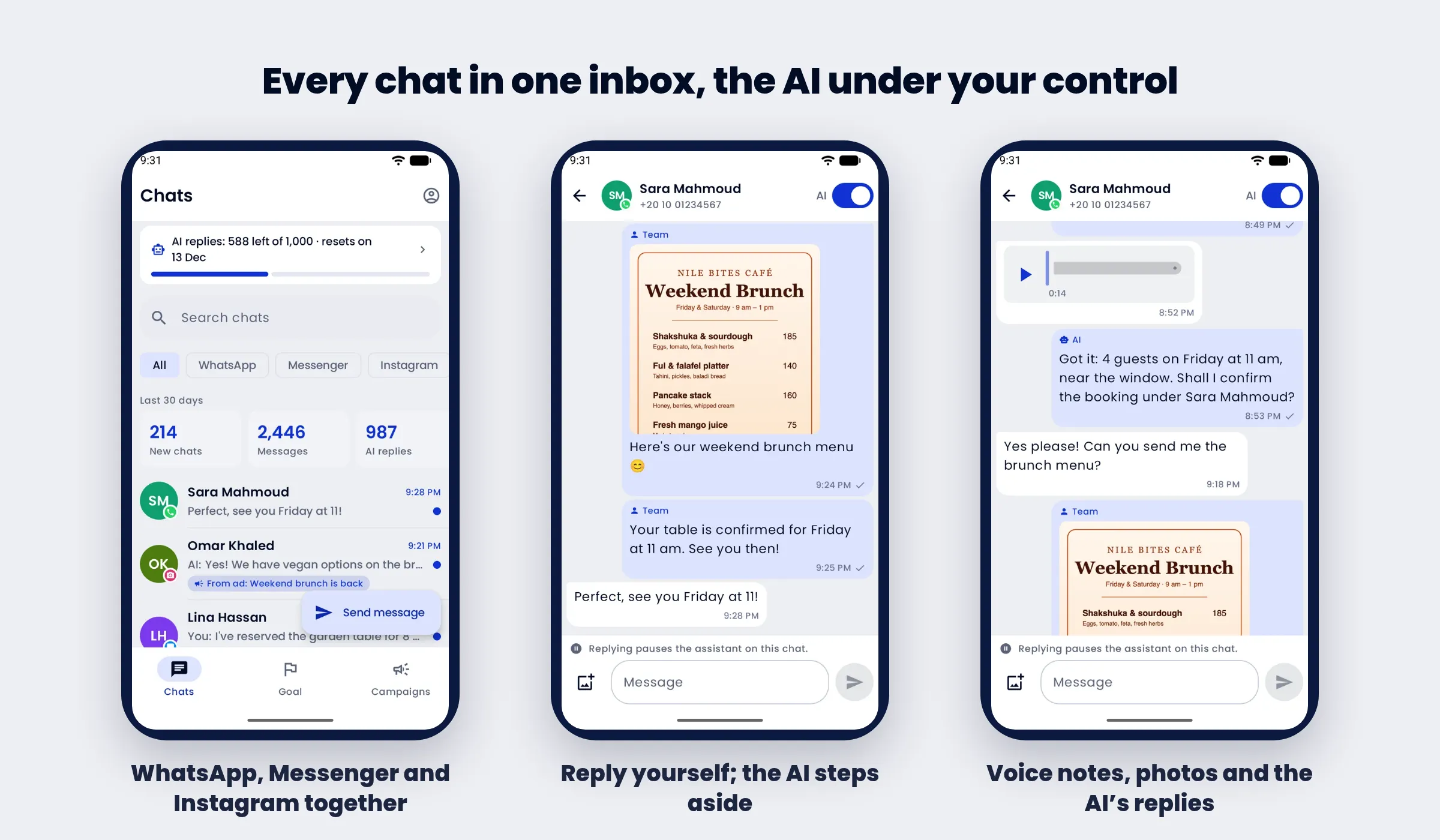
Inside a conversation you see everything: the customer's messages, the assistant's replies marked "AI", your team's replies, photos and voice notes. Voice notes play in the app, and the assistant understands them too.
- Reply yourself at any time. Write or send a photo, and the assistant pauses on that chat so it doesn't talk over you.
- Switch the AI off for one customer with the switch at the top of the chat, and on again when you are done.
- Switch it off for everyone from your profile ("Assistant in all chats") when you'd rather answer by hand for a while.
Every new customer message sends a notification to the phone with the customer's name and the start of the message. A new lead or a new store order does the same. You can mute notifications on one phone without affecting the rest of the team.
Message a customer after the 24-hour window
WhatsApp lets a business send free-form messages only within 24 hours of the customer's last message. After that, only a template approved by Meta can open the conversation again. That is Meta's rule, and it applies to every app on the API.
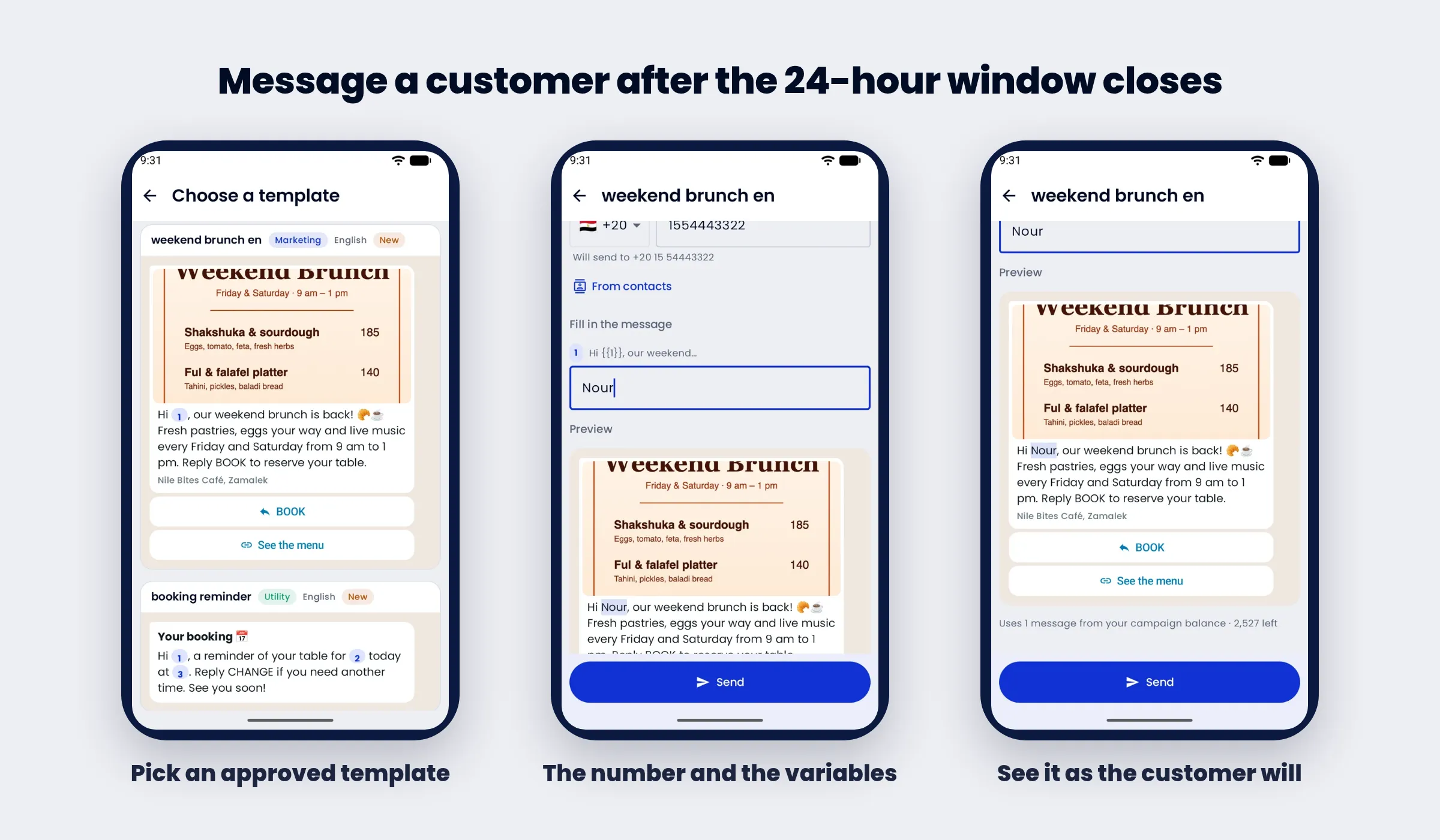
From the app, tap "Send message", choose an approved template, type the number or pick a contact, and fill the template's variables, such as the customer's name. The preview shows the message as the customer will see it, picture and buttons included, before you press Send. Each send uses one message from your campaign balance, and the screen shows how many are left.
The leads the assistant collected, in the Goal tab
You can give the assistant a goal: book a table, take an order, collect the details of an interested customer. It steers each conversation towards it and saves the details it collects as a lead. The Goal tab lists them with their details (in the example: date, time and number of guests) and the channel they came from.
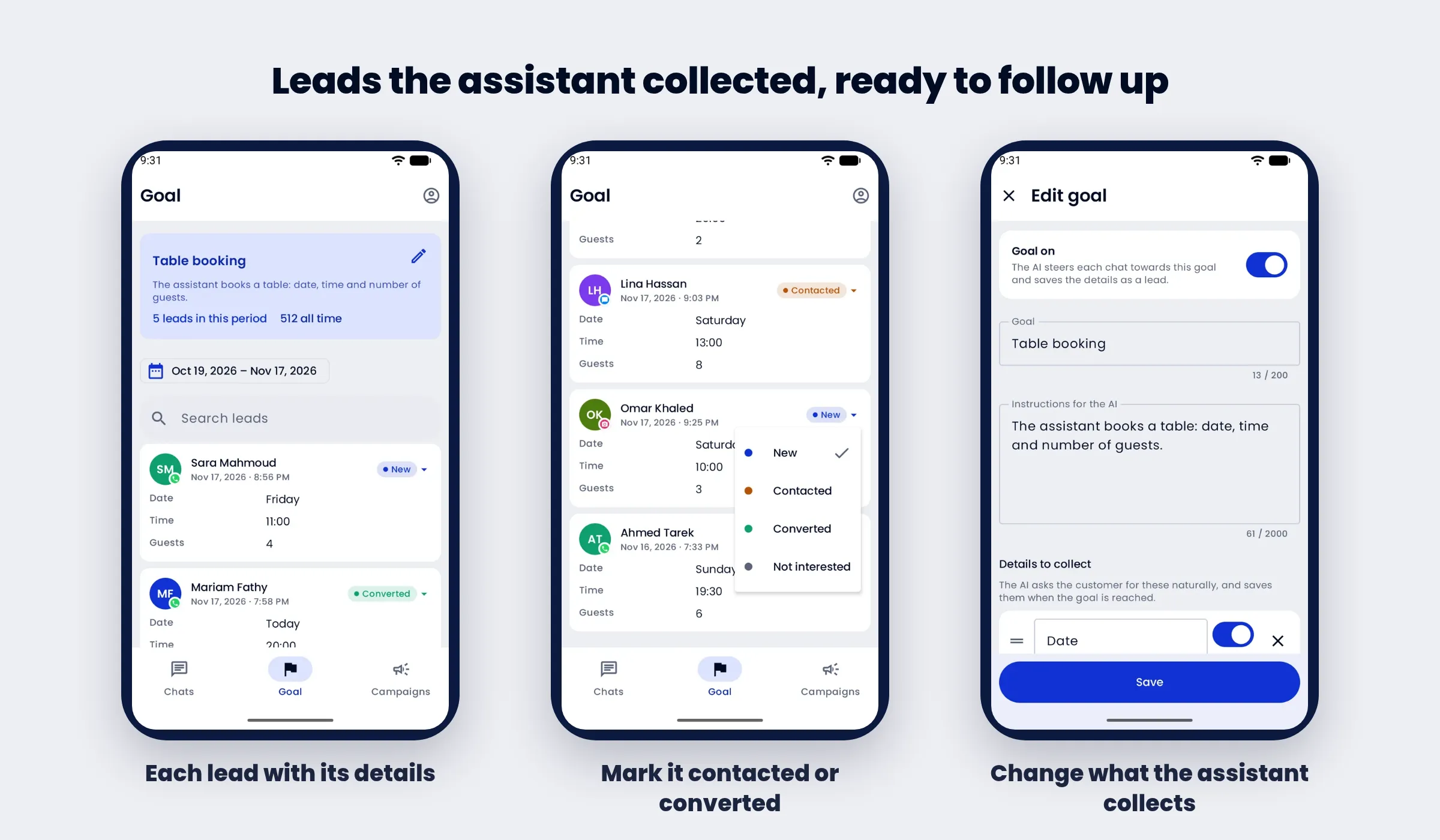
Change a lead's status with one tap: New, Contacted, Converted or Not interested. Your team then knows who still needs a call. From the same tab you can switch the goal on or off, rewrite its instructions and choose which details the assistant collects.
Campaigns and templates on the go
You send big campaigns from the dashboard, where you upload the lists. What you want on the phone is the result, and the app shows it:
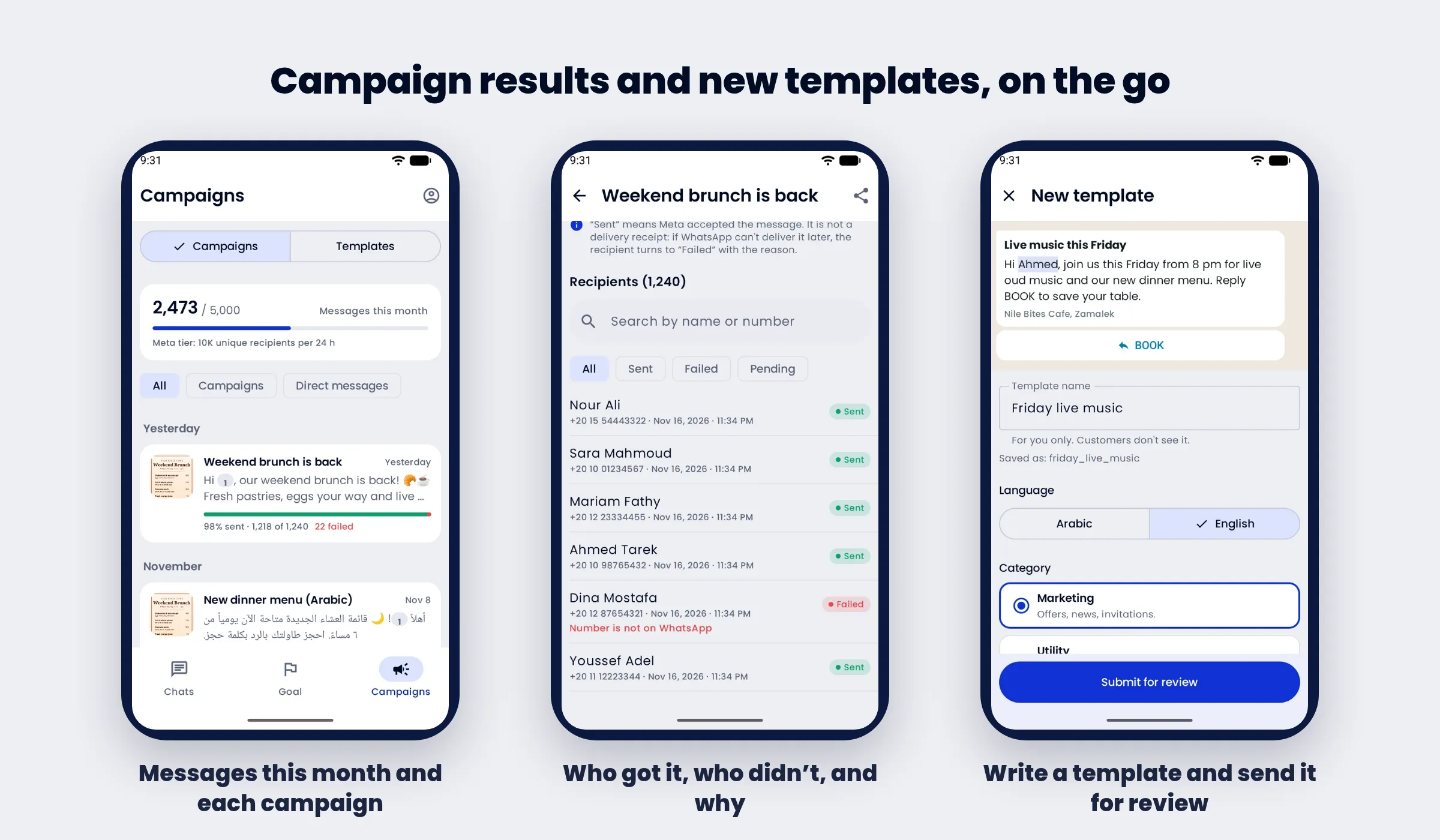
- Campaign messages used this month against your plan, and your number's Meta sending tier.
- Each campaign's delivery rate, with a count of sent, failed and pending.
- Who received it and who didn't, and why. For example, "Number is not on WhatsApp" under a number that will never receive anything. "Sent" means Meta accepted the message. If Meta can't deliver it later, the recipient turns to "Failed" with the reason.
- Write a new template and send it to Meta for review: name, language, category, the text with variables, a footer, an opt-out line and up to three buttons. The status shows on the template when Meta answers.
Your plan, the assistant's instructions and every version
Your profile shows how much of the month's AI replies and campaign messages you've used and when they reset. It also holds the switch for the assistant in all chats, notifications and a test notification, and the link to the web dashboard for everything else.
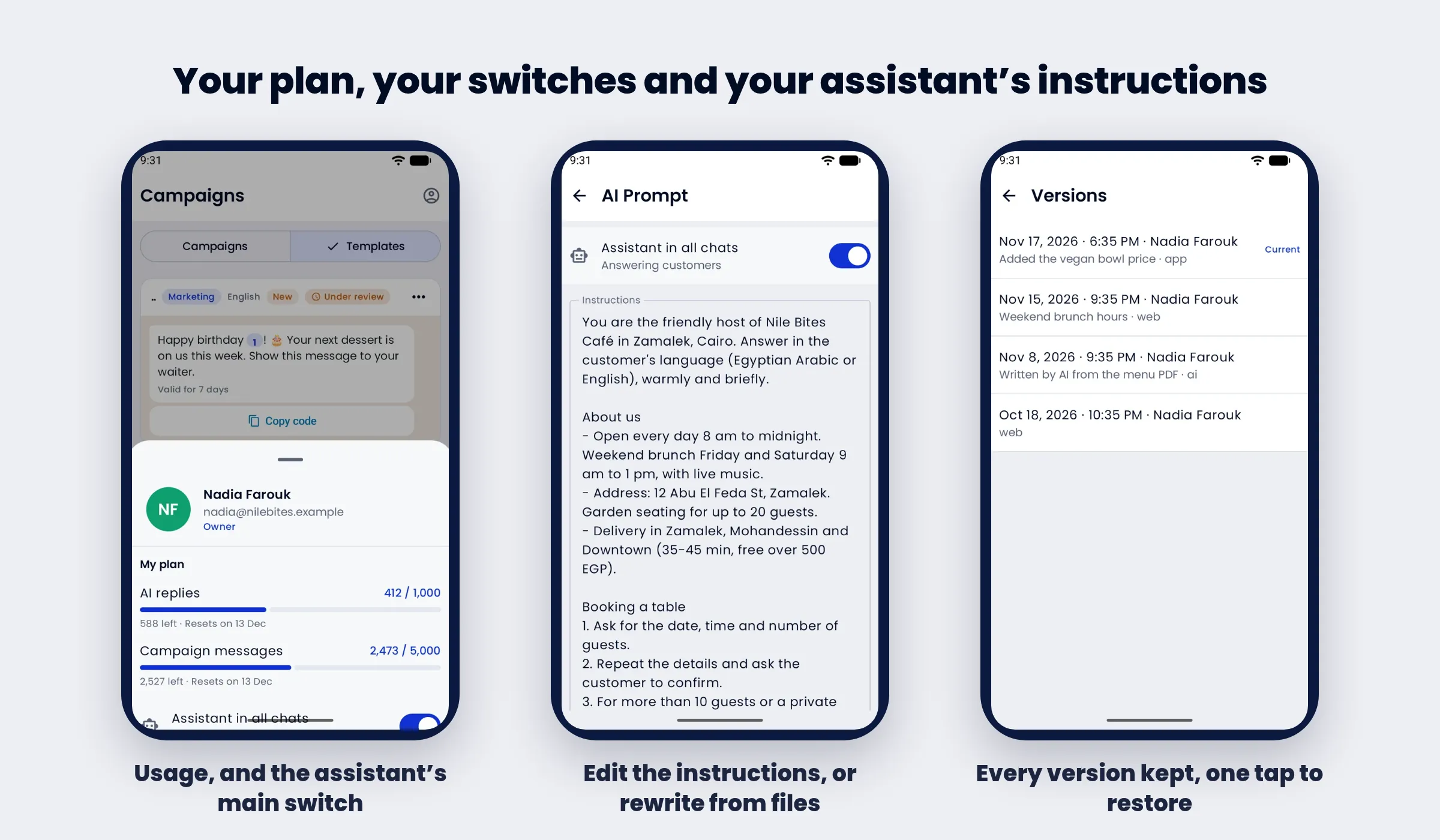
The AI Prompt screen holds the assistant's instructions. You can edit them directly when a price or opening hour changes, or ask the AI to "Write it again from my files". Every save is kept as a version with its date, who made it and where (app, web or AI). If an edit goes wrong, open an earlier version and restore it with one tap.
If you use the advanced assistant, with files, folders and skills, the app opens its page on the website.
The free trial and the plans
The app is for businesses with an active plan:
- New accounts get a free trial of any plan: 14 days or 500 AI replies, whichever comes first, through Google Play. Nothing is charged on the first day, and you can cancel at any time from Google Play.
- Accounts that already pay on the website, by card or through Shopify or Salla, sign in and use the app at no extra cost. Team members join under their account's plan.
| Plan | AI replies a month | Price |
|---|---|---|
| 1,000 | 1,000 | 499 EGP / $9.99 |
| 3,000 | 3,000 | 899 EGP / $17.99 |
| 10,000 | 10,000 | 2,099 EGP / $41.99 |
| 25,000 | 25,000 | 4,299 EGP / $85.99 |
| 50,000 | 50,000 | 7,399 EGP / $147.99 |
| 100,000 | 100,000 | 12,399 EGP / $247.99 |
Every plan includes 1,000 campaign messages a month and one seat, at the same prices as our pricing page. Meta's own price for template messages is billed separately to your Meta account.
You can delete the account from inside the app (Profile → Delete my account). That closes the business account and signs everyone out, and the data is deleted within 90 days.
WhatsApp Business app or the ExceliaBOT app?
They are not competitors. Many of our clients use both on the same number. With Meta's coexistence, you keep the WhatsApp Business app on your phone and the AI assistant answers through the API. If you reply from WhatsApp Business, the assistant sees your reply and steps aside on that chat.
The difference is what each one is for. WhatsApp Business is a chat app. The ExceliaBOT app manages an assistant that answers on four channels, collects leads, runs campaigns and keeps a record of everything it said.
FAQ
Is there a WhatsApp auto reply app for Android that uses AI?
Yes. The ExceliaBOT app on Google Play controls an AI assistant that answers your customers on WhatsApp through the official API, in their language and dialect. It also covers Messenger, Instagram and your website chat.
Does my phone need to stay on for the assistant to reply?
No. The assistant runs on our servers, not on your phone. The app only shows you what is happening and lets you step in.
Can I reply to customers myself from the app?
Yes, at any time, with text or a photo. The assistant pauses on that chat while you talk to the customer.
Can I message a customer who wrote to me more than a day ago?
Yes, with a template approved by Meta. Choose it in the app, fill the variables and send. That is WhatsApp's rule for every business, not a limit of the app.
Can I set up the assistant without a computer?
Yes. You create the account, describe your business and switch the assistant on from the phone. Only one case needs a computer: Meta asks you to scan a QR code and the WhatsApp Business app is on the same phone.
Is there an iPhone version?
It is on its way. Until then, the full dashboard works in the iPhone's browser at bot.exceliamarketing.com.
Can more than one person on my team use the app?
Yes. Each team member signs in with their own account and holds one seat on the plan, and each can mute notifications on their own phone.
How do I cancel the subscription?
If you subscribed in the app, cancel from Google Play → Subscriptions. The plan stays until the end of the paid month.
Sources: Meta's documentation on the WhatsApp Cloud API and message templates; ExceliaBOT help center articles on connecting channels and the reply window. The screenshots come from a demo account with a made-up café. The numbers come from the ExceliaBOT platform: phones registered with the app since 8 October 2026, and notifications delivered between 18 October and 17 November 2026, excluding our own accounts.