Every business that puts an AI assistant on WhatsApp starts the same way: a box, and a page of instructions. You are the assistant of… We sell… Our prices are… If the customer asks about delivery… It works on the first day. By the third month the page is four screens long, the old prices are still in it next to the new ones, two paragraphs disagree about the return policy, and nobody on the team dares to touch it.
Whether you call it a WhatsApp AI chatbot, a WhatsApp AI agent or AI customer service, that is the problem we set out to solve this month. The result is the advanced assistant in ExceliaBOT: instead of one block of text, the assistant is built from parts you fill in, each in its own place — and it answers from your own files instead of from a summary someone typed once. We ran it on our own WhatsApp number for twelve days before writing this, and it is open to every account.
In short
- A WhatsApp AI agent should answer from your files — the price list, the policies, the catalogue — not from a paragraph that was true in August.
- Split the job: who it is (persona), what it does in each situation (skills), what it knows (files) and what it shows (pictures). Each part changes without touching the others.
- Some things are never the AI's job: working out an instalment, saying an order has shipped, promising stock. The system does those and the assistant only says them.
- Everything is a draft you test in a chat first. Your customers see nothing until you press Save and switch on.
- On our own number: 249 conversations in twelve days, 14 people booked a call with us through the chat, and 2 complaints went straight to the team.
Auto reply, chatbot or AI agent: what is the difference on WhatsApp
Three things go by the same name, and only one of them answers a real question:
| What it does | Where it stops | |
|---|---|---|
| WhatsApp Business auto reply | Sends one fixed message — a greeting, an away message — whatever the customer wrote. | It cannot answer anything. |
| A menu chatbot | Offers numbered choices: press 1 for prices, 2 for branches. | The customer's question is rarely one of the choices. |
| An AI agent | Reads the message, finds the answer in your information, replies in the customer's language, and takes the booking or hands over. | Only where your information stops — which is why it should answer from your files. |
People search for "ChatGPT for WhatsApp Business" because they want the third kind. You do not need to connect ChatGPT or buy an API key for that: the AI is built into ExceliaBOT, and what makes it useful is not the model but what it is allowed to read.
Why one long prompt breaks
A prompt is a good way to start and a bad way to run a business. Four things go wrong, in this order:
- It only grows. Every new question a customer asks becomes a new line. Nothing is ever removed, because nobody remembers why it was added.
- It contradicts itself. The Ramadan offer is still there in Shawwal. Shipping is "two days" in one paragraph and "two to four" in another. The model picks one, and not always the same one.
- It cannot hold your real information. A price list of 300 items, a returns policy, the warranty terms — nobody pastes those into a prompt, so the assistant answers from a summary, and a summary is where the wrong price comes from.
- It cannot be tested safely. A change goes live on the next customer message. The first person to find out that it broke something is a customer.
None of this is the model's fault. It is doing exactly what the page says. The fix is to stop asking one page to do four jobs.
Four parts instead of one page
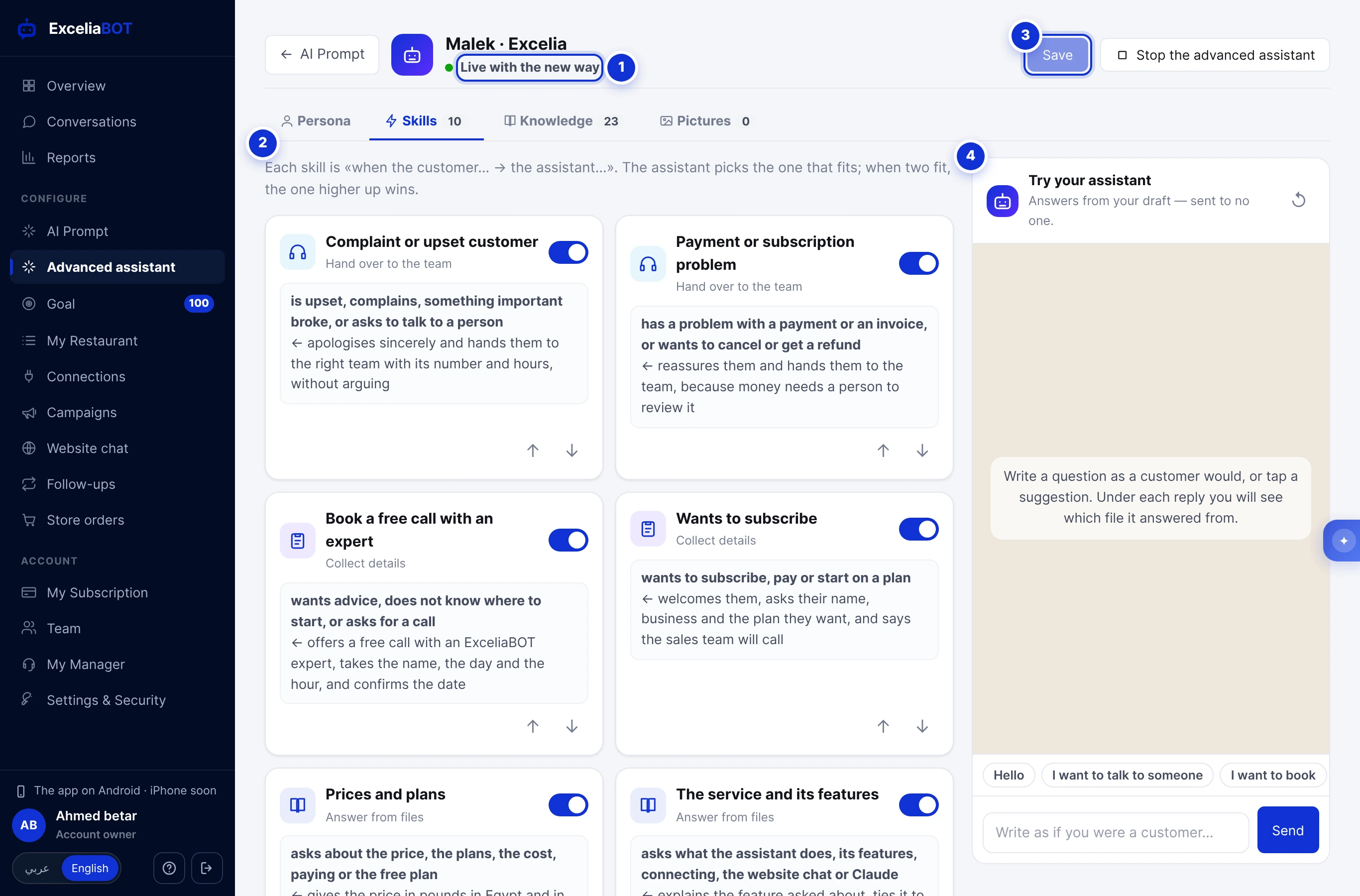
| Part | What it holds | How often it changes |
|---|---|---|
| Persona | The assistant's name, the language and dialect it speaks, its style, the welcome message and its buttons, the numbers of your departments. | Rarely. |
| Skills | What it does in each situation, written as when the customer… → the assistant…: answer from a folder, take a booking, hand over to the team, tell the opening hours, work out an instalment. | When your process changes. |
| Knowledge | Your own files in folders: price lists, policies, catalogues, FAQs, a page of your website. | Every time a price changes. |
| Pictures | A menu, a price sheet, a map, with a line saying when to send each one. | Now and then. |
The point of the split is that each part changes alone. A new price list is a new version of one file — the persona and the skills do not move. A new way of taking bookings is one skill — the files do not move. Nobody edits a four-screen paragraph again.
The first time you open the page it asks what kind of business you run and looks at what your account already has — a product catalogue, Store orders, a menu, the Goal page, the website chat — and builds a first version from that in a few seconds, as a draft. You start from something, not from an empty box.
Skills: one situation each
A skill is two lines in your own words. When the customer asks for a price or a plan → the assistant answers from the Pricing folder and offers a call with an expert. There is no prompt to write; the type of skill decides what the system does around those two lines.
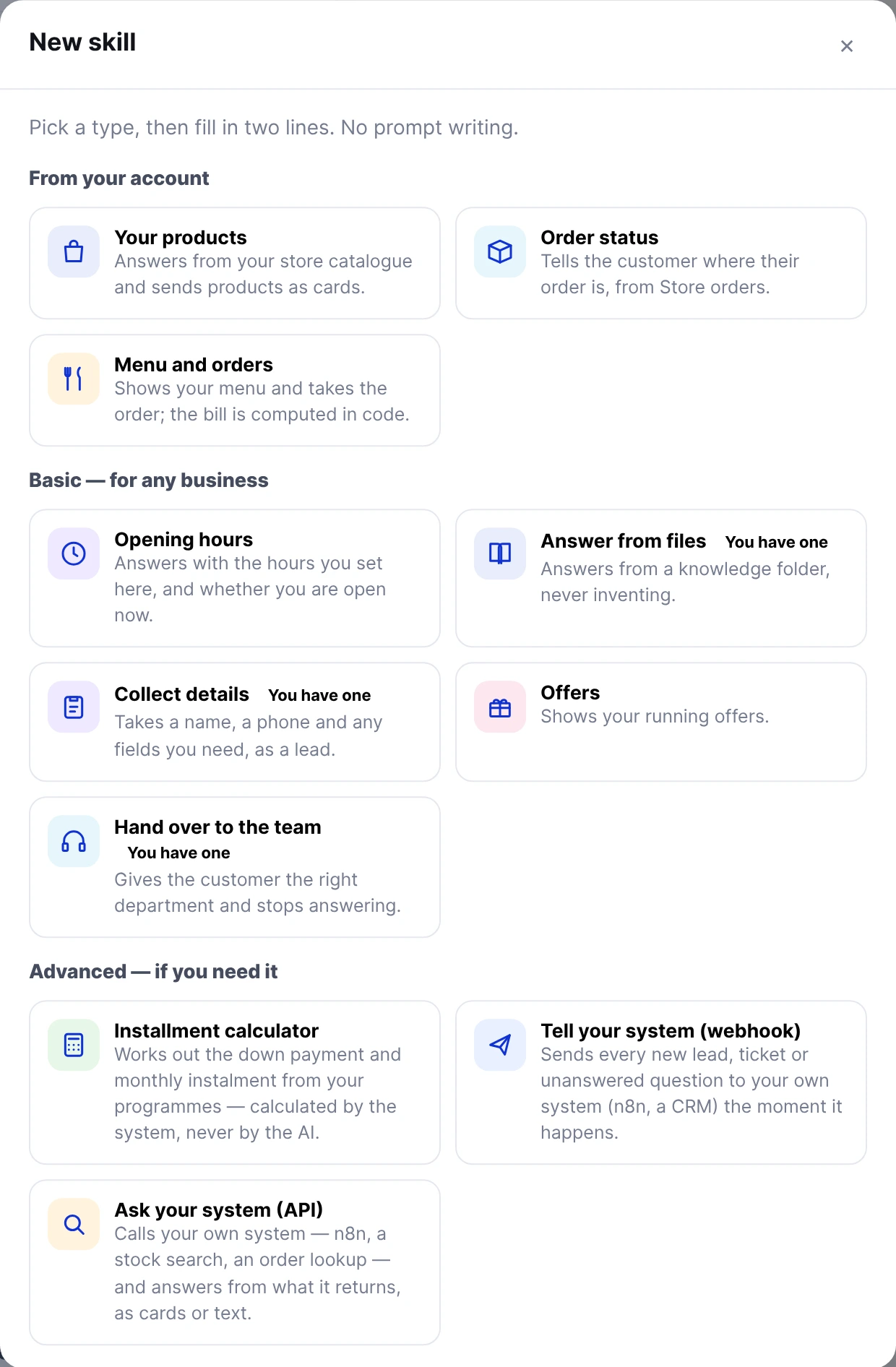
Three kinds of skill do most of the work for most businesses:
- Answer from files reads one folder of your Knowledge tab. A clinic has a folder for services and one for prices; a store has one for shipping and returns.
- Collect details gathers the fields you list — a name, a date, a service — and saves them as a lead on the Goal page under the skill's name. The assistant asks only for what is still missing, and the platform remembers what was already given, so a customer who answers in three messages over an afternoon is not asked their name three times.
- Hand over to the team takes a short ticket, gives the right department's number, and steps aside: the chat's AI pauses for six hours (or the time you choose) and the conversation header tells your team it was handed to them. A complaint should reach a person, not a third apology from a bot.
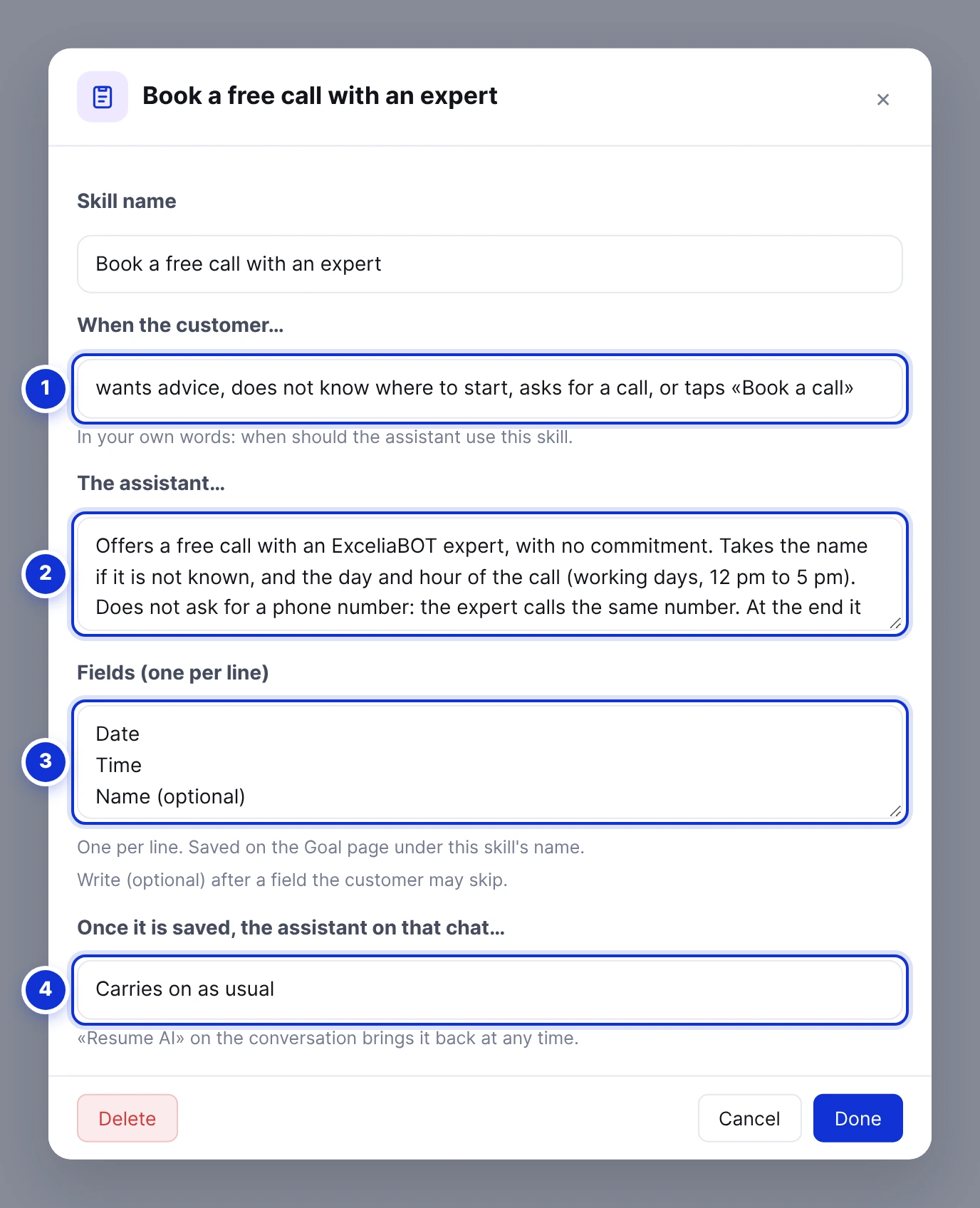
When two skills could fit a message, the one higher in the list wins; you move them with the arrows. A switch turns a skill off without deleting it — useful for an offer that runs only on weekends.
Train the AI on your own data: answering from your files (PDF, Word, Excel)
When a customer writes, the system looks through your files for the passages closest to the question and hands those passages to the assistant together with the message. The assistant answers from them. It does not read all 300 items of the price list every time; it reads the five lines that matter. Engineers call this retrieval (RAG); for you it means there is nothing to train and nothing to retype — you upload the PDF and the assistant answers from it.
Two lessons from building it:
A weak match is still worth showing. In our early tests we asked whether we accept Vodafone Cash. The answer was in our pricing file, but the passage scored just under the bar we had set, so the assistant was shown nothing and handed the chat over. Now the closest passages always ride along, marked as weak, and the assistant decides whether they answer the question. The same question is answered from the file today.
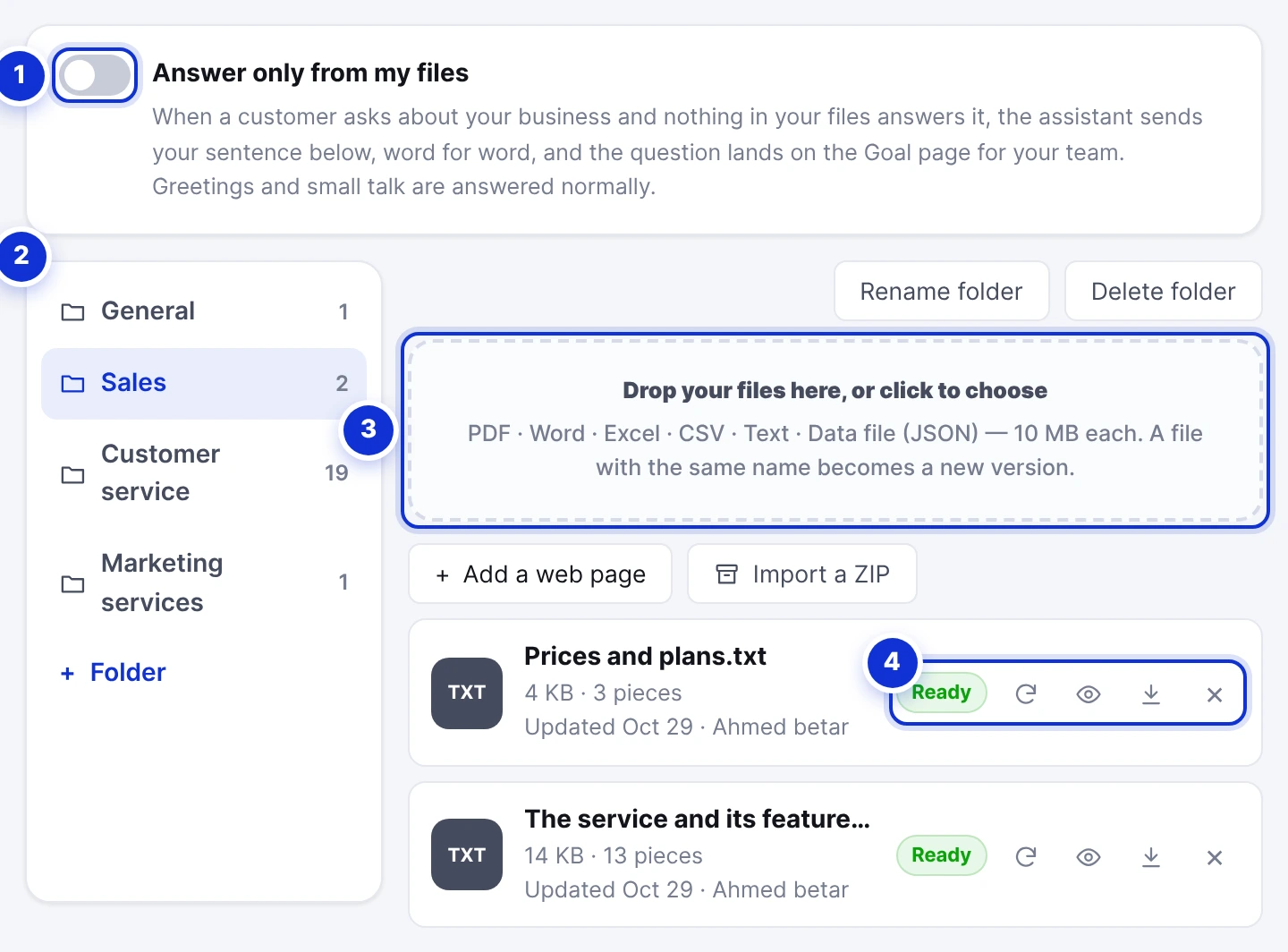
Read what the assistant reads. Every file has an eye button that shows the text extracted from it. A scanned PDF is a photograph of a page — it has no text, and the page refuses it and says so. An Arabic PDF can come out with words in the wrong order; we fixed the cases we found, and the eye button is how you check yours.
Then there is the switch at the top: Answer only from my files. With it on, a question your files do not answer gets your own sentence, word for word — "I'll check this with the team and get back to you" — in Arabic or English by the customer's language, and the question lands on the Goal page under Unanswered questions. That tab is your to-do list: answer the customer, add the answer to a file, and the next customer gets it from the assistant.
What the assistant will never work out by itself
Some answers are too expensive to get wrong, so the AI does not produce them. It asks the system and says what the system returned.
- Money. The Instalment calculator skill holds your programmes — minimum down payment, rate, terms. The assistant fills in the product price, the down payment and the months; the system does the arithmetic and writes the figures under the assistant's sentence. While we were setting this up for a client who sells on instalments, the model, given only the files, worked out a monthly payment of 17,292 where the right figure was 18,304. That is the reason the rule exists, and the reason it now applies to every account: never a money amount without the calculator.
- Order status. The Order status skill reads your Store orders. On WhatsApp it finds the orders of the number that is writing — and an order is described only to the phone it was placed with. The model never states a status; the system writes it.
- Stock. The assistant does not say an item is available unless a catalogue or your own system said so. Ask your system calls your stock search, your booking system or an n8n flow over https, with a secret header you type once and never see again, and answers from what comes back.
A draft, a test chat, then your customers
Everything you change is a draft. Your customers keep getting the replies they get today until you press Save and switch on, and the AI Prompt page keeps your old instructions — one button brings them back.
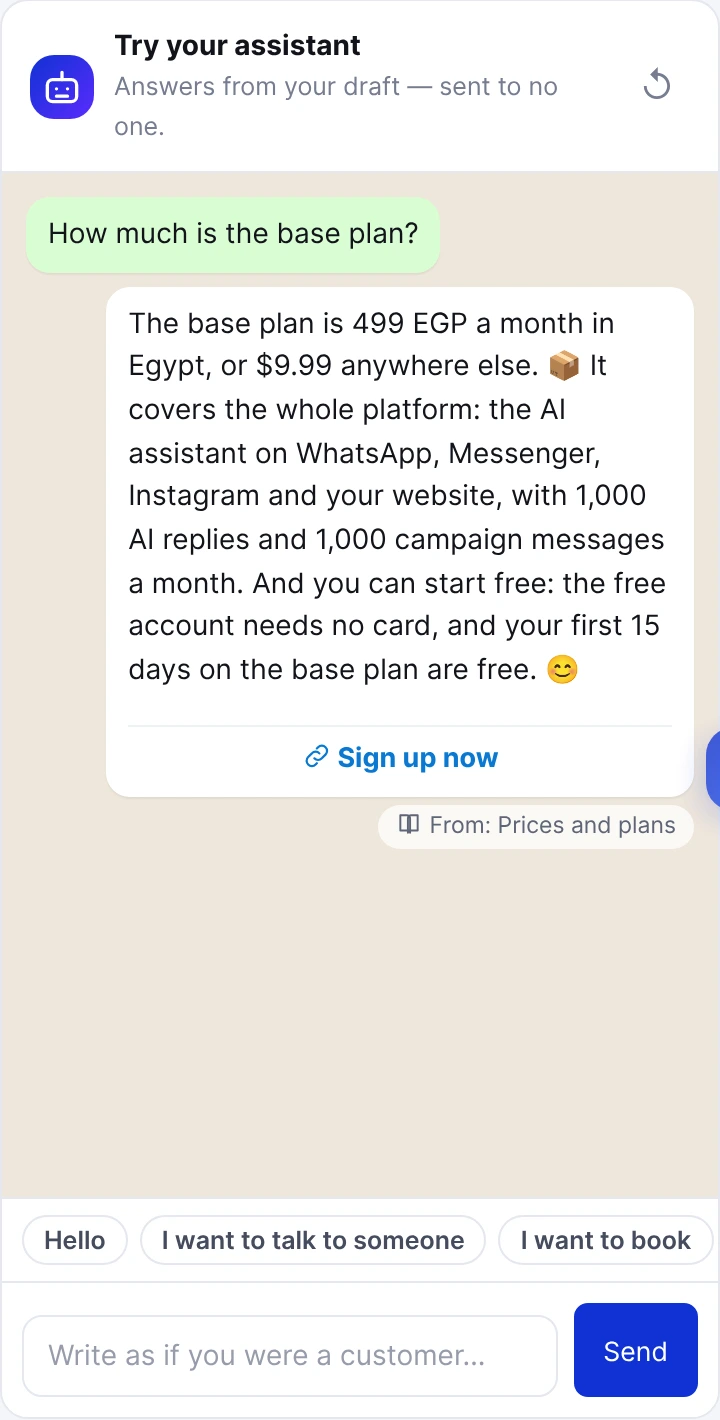
Beside the tabs there is a chat. Write as a customer — the price, the address, can I pay in instalments, and one question that has nothing to do with your business — and read what your draft answers. Under each answer it says where the answer came from: the file, the calculator, the lead it would save, or that it would hand the chat over. Fix the file or the skill when an answer is wrong and ask again. The test messages do not count against your AI replies.
We sent 319 test messages to our own draft before and after switching it on. Most of them were the same twenty questions, asked again after each change. That is what testing an assistant looks like: not one clever question, but the boring ones, repeatedly.
What our own assistant did in its first twelve days
Our own WhatsApp, Messenger and website chat have run on the advanced assistant since the evening of 24 October. It has 23 files in 3 folders — general, sales and customer service — and 10 skills: pricing, features, technical support, a free call with an expert, a sales callback, a payment or subscription problem, a complaint, general questions, wanting to subscribe, and explaining the Meta ads report.
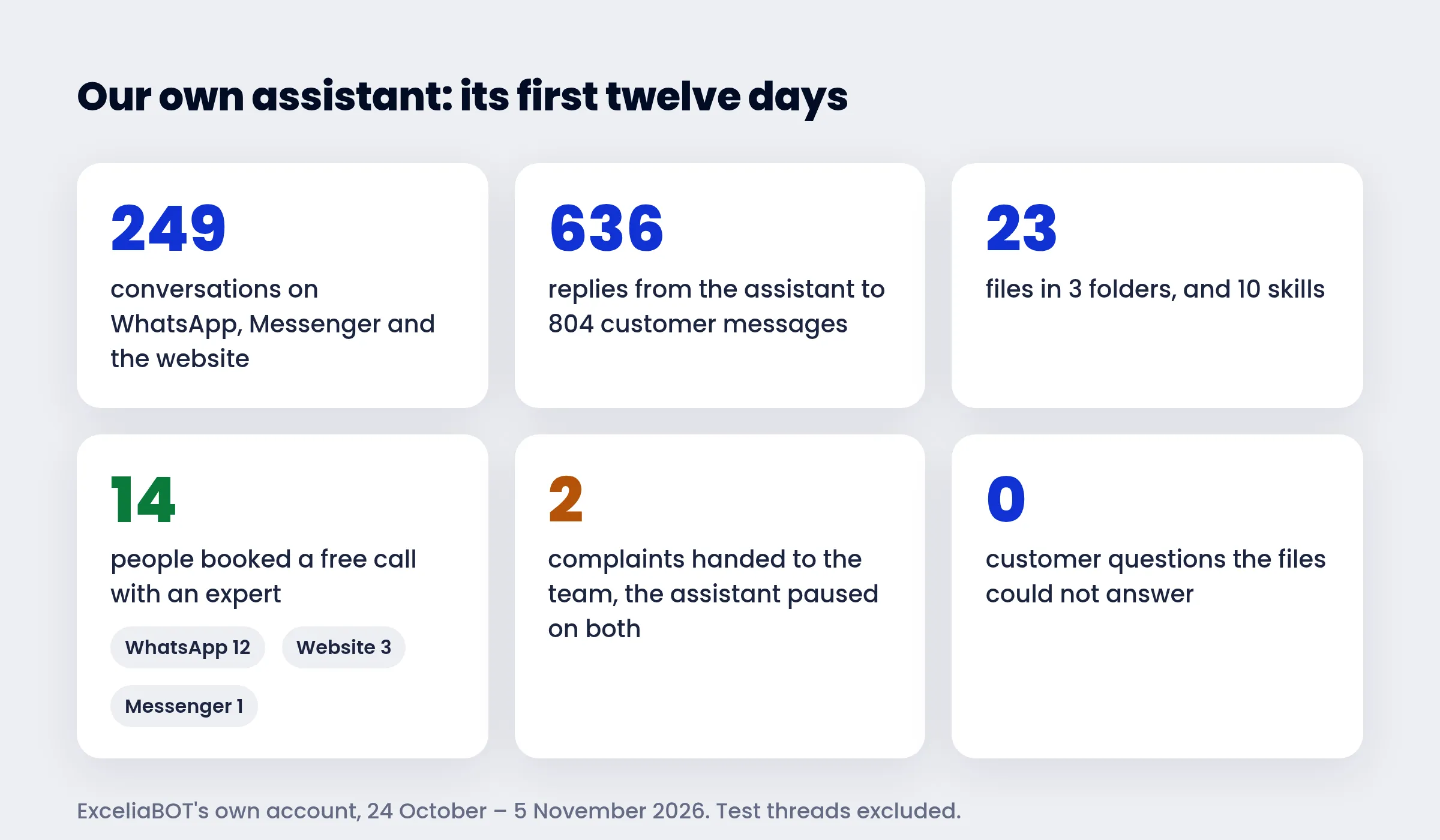
- 249 conversations, 804 customer messages, 636 replies from the assistant.
- 14 people booked a free call with an expert through the Collect details skill — 12 on WhatsApp, 1 on Messenger, 3 on the website chat (some changed the time once, so the Goal page shows more entries than people). Each booking arrived on the Goal page with the name, the day and the time, and a push to our phones.
- 2 complaints were handed to the team, and on both chats the assistant paused so that one of us could take over.
- No customer question was left unanswered by the files. The Unanswered questions tab holds only our own tests.
These are small numbers from one business, ours. They say the parts work together on real conversations; they do not say how your customers will behave.
How to build a WhatsApp AI chatbot without code, in fifteen minutes
- Open Advanced assistant in the sidebar, pick your kind of business and press Set up my assistant.
- On Persona, set the name, the dialect and the welcome line. Add the numbers of the departments it may hand customers to.
- On Knowledge, make a folder per subject and drop your files in — PDF, Word, Excel, CSV or text, or the link of a page on your website. Press the eye on each file once.
- On Skills, keep the ones the page suggested, delete what does not fit, and write the two lines of each in your own words. Add Collect details for whatever you want on the Goal page.
- Ask the test chat the twenty questions your customers really ask. Fix, ask again.
- Press Save and switch on. The next customer message on every channel is answered the new way.
The ✦ assistant in the corner of your dashboard knows this page too: ask it to add a skill for bookings, or attach a PDF and ask it to file it under Prices. Every change it proposes waits as a card with Confirm and Cancel and lands in the draft; switching it on for your customers is a card of its own. The full walk-through with every screen is in the help center: The advanced assistant: persona, skills and your files.
Frequently asked
Is there a free WhatsApp AI chatbot?
Yes. The ExceliaBOT free plan includes the advanced assistant, the files and the test chat, with no card and no time limit; it only has a smaller monthly number of AI replies.
How much does a WhatsApp AI chatbot cost?
On ExceliaBOT the AI replies are part of your plan. Meta adds its own price on WhatsApp: since October 2026 each number gets 1,000 free service replies a month, and past that Meta bills its utility rate on your Meta account (about $0.0036 a reply in Egypt). Messenger, Instagram and the website chat cost nothing extra.
Does it reply in Arabic, and in Egyptian dialect?
Yes. On the Persona tab you choose Egyptian Arabic, light Modern Standard Arabic, English, or the customer's own language, and the files can be in Arabic, English or both.
Do I need to connect ChatGPT to WhatsApp?
No. The AI is built in; there is no API key to buy and no code to write. You connect your WhatsApp number once from the Connections page.
Does it cost more than the AI Prompt page?
No. A reply is an AI reply either way and counts against the same monthly number. It is included in every plan, the free one too.
Can it make up a price?
It is told to answer only from your files and never to work out an amount by itself; instalments come from the calculator skill. Switch on Answer only from my files for the strictest setting.
How do I update a price list?
Upload the new file with the same name, or use the circular arrow on the old one. The live assistant keeps the old version until you press Save; Versions keeps the last ten, and Put back restores any of them as a new draft.
Which files can I upload?
PDF, Word, Excel, CSV, plain text and JSON, up to 10 MB each, or a page of your website by its link. A ZIP of files at once works too. A scanned PDF has no text to read and is refused.
Does it work on Messenger, Instagram and the website as well as WhatsApp?
Yes. It is the same assistant on every channel you connect, with the same files and skills.
Can I go back to my old instructions?
At any time: Stop the advanced assistant at the top of the page. Nothing is deleted on either side.
Who can change it?
The account's owners. Team members do not see the page.
Sources: the numbers are from our own ExceliaBOT account — the Goal page, the conversations and the platform's logs — from 24 October 2026, 21:03 Cairo, to 5 November 2026, with our test threads excluded. The step-by-step guide is the help center article The advanced assistant.