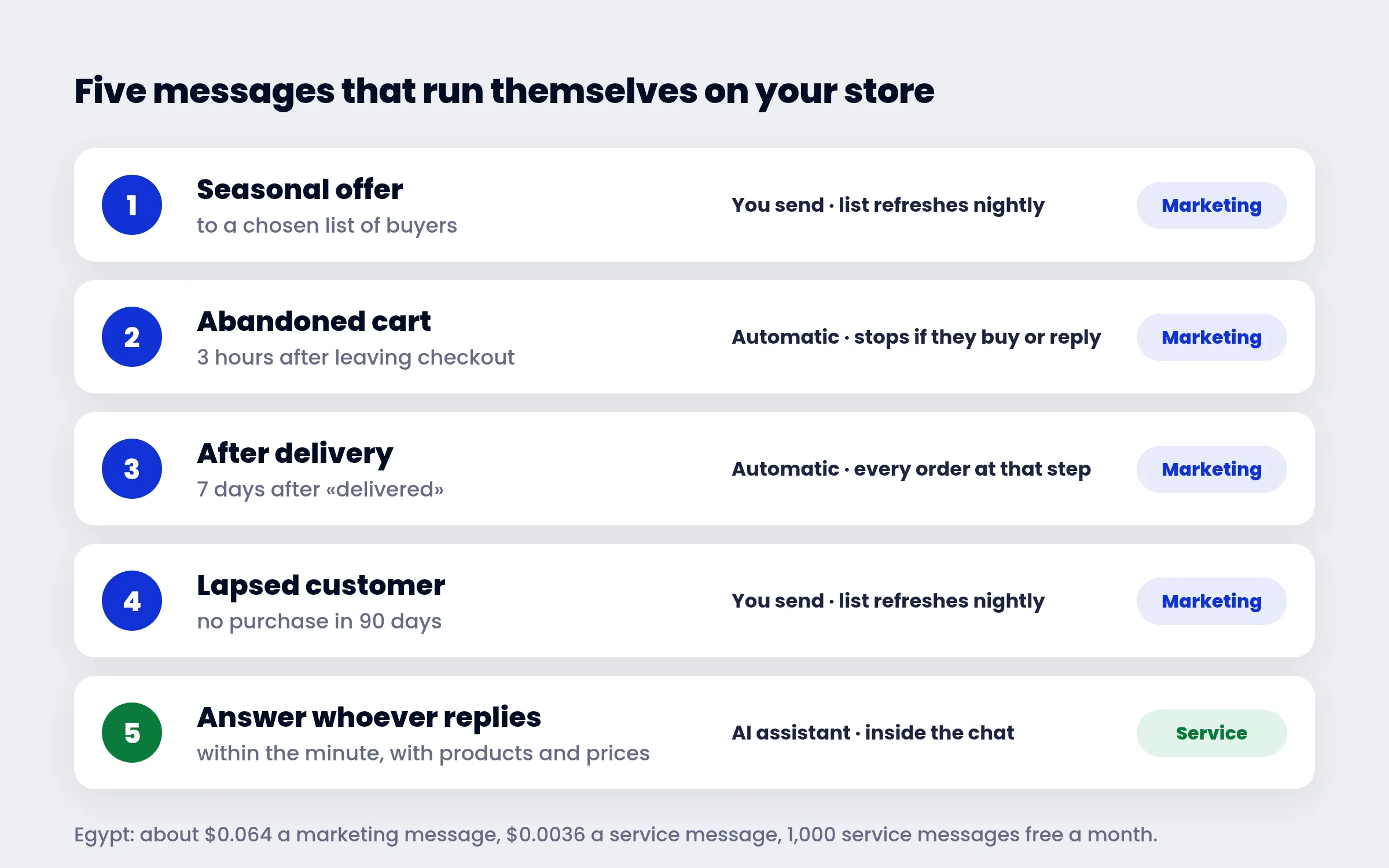
Most stores handle their WhatsApp offers one way. A season or a sale comes around, every number goes into a spreadsheet, one message goes out to all of them, and nothing happens again until the next sale. The message lands on the customer who bought yesterday and the one who has not bought in a year, on the one who left a product in the cart an hour ago and the one who no longer remembers the store's name. Some buy. Many ignore it. A few block the number.
Automating offers is something else. It does not mean sending more. It means each message reaches the person who needs it at the moment it helps: the customer who left a cart is reminded a few hours later, the one who received an order is offered what goes with it a week later, the one who has been gone for three months is invited back with a discount. And once you set it up, it runs by itself.
This post is about five messages of that kind — when each one goes, what it says and how to set it up without code. Alongside them is what we saw in the marketing messages our clients actually sent over the last five weeks, because the biggest risk to automated offers is not that they fail to sell. It is that Meta stops delivering them.
In short
- Automation is not more messages. It is one message per situation: a left cart, a delivered order, a lapsed customer, a seasonal offer to a chosen list.
- The abandoned cart message and the post-delivery offer run entirely on their own, and stop by themselves when the customer buys or replies.
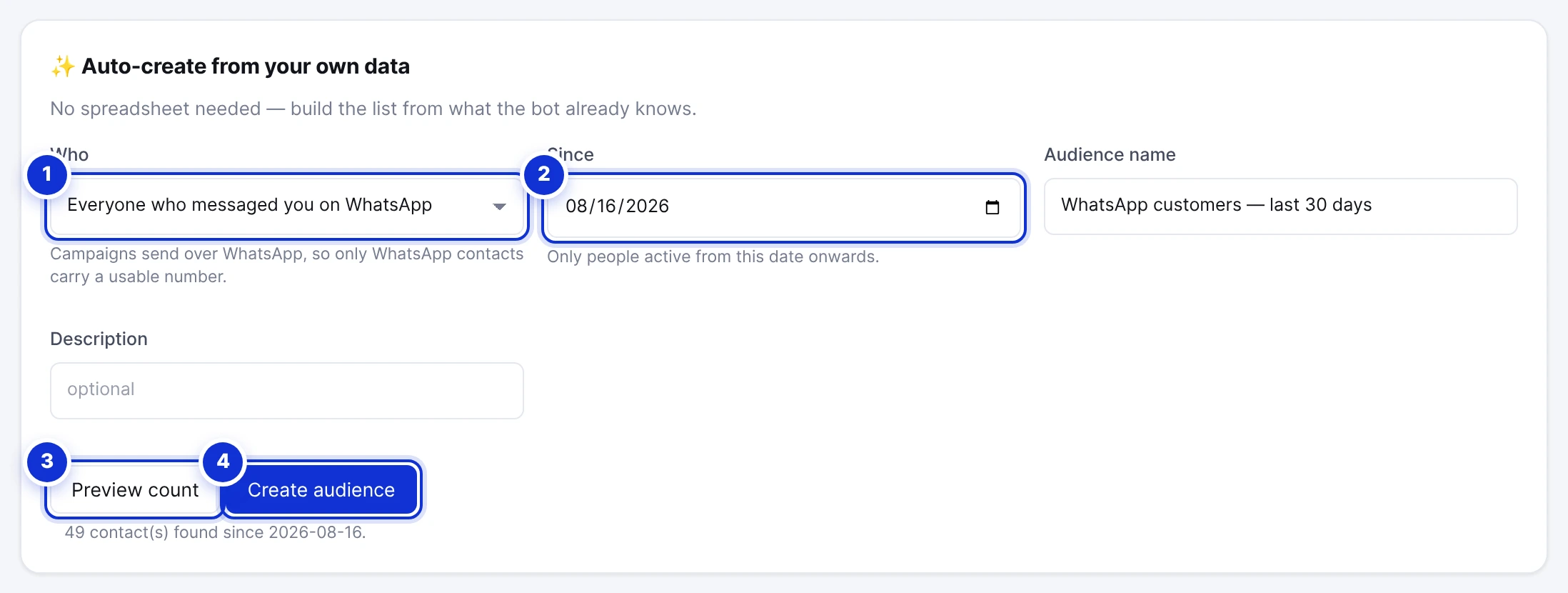
- Customer lists — who bought, who lapsed, who left a cart — are built from your store's own data and refresh every night.
- Of 7,950 marketing messages our clients sent in five weeks, 26% were not delivered. The biggest reason was not wrong numbers but Meta's limit on how many offers one person receives.
- A marketing message in Egypt costs about $0.064; a reply inside the conversation is about 18 times cheaper. Good automation starts with a short offer and leaves the rest to the conversation.
Marketing automation vs bulk messages
Bulk messaging answers one question: how do I send this message to all of these people? We wrote a full guide to that: WhatsApp bulk messages from an Excel sheet.
Marketing automation answers two other questions: who needs this message right now? and what happens after they read it? The first answer comes from your store's data — orders, left checkouts, purchase dates. The second comes from the conversation. The customer who replies to an offer asks about a size, a colour or a price, and whoever answers within the minute makes the sale. Whoever answers the next day usually does not.
So WhatsApp automation for an online store has three parts:
- A list that keeps itself up to date from the store's data, instead of a spreadsheet gathered by hand every time.
- A message sent at the right time, after a specific event (a left cart, a delivered order) and a wait you choose.
- An instant answer for whoever replies, with products, prices and the order completed in the same chat.
Message 1: the abandoned cart reminder
The customer who reached checkout and left is the closest one to buying. They chose the product, typed their address and number, and then got busy, hesitated over the price or wanted to ask something first. One message a few hours later brings them back to the same checkout, with the same items in the cart.
How it works: the store tells us about every checkout left behind (on Shopify and Salla). After the number of hours you set, if the customer has not completed the purchase, they get a message with their name and their items, and a Complete my order button that opens their own checkout. If they buy before the message is due, it never goes. If they reply, the next messages stop and the conversation takes over.
Abandoned cart WhatsApp message template:
Hi {{1}}, you left {{2}} in your cart.
We've kept it for you — you can finish your order from the button below in under a minute.
Any question about size or delivery? Just reply here.
[Complete my order]
Suggested timing: the first message after about 3 hours, a second one a day later if they have not bought — the second can carry a coupon. Never more than two for the same cart.
Note: Meta requires the customer's consent to receive marketing messages. That is why the list takes, by default, only customers who accepted marketing at checkout. You can change that.
Message 2: an offer after delivery
The easiest customer to sell to is the one who just bought from you and was happy with the order. They know the store, the parcel arrived, they tried the product. A week after delivery is a good moment to offer something that goes with it, or a discount on their next order.
How it works: in Follow-ups you choose «Orders at a step in Store orders», pick the step (delivered) and the wait (7 days, say), then the template. Every order that reaches that step enters by itself, and leaves if the customer replies. It works with any connected store: Shopify, Salla, Easy Orders, or any store that sends its orders through the webhook.
Template:
Hi {{1}}, we hope you're enjoying order {{2}}.
Here's 10% off your next order, valid for one week.
[Copy code]
The Copy code button is a built-in WhatsApp template button: the customer taps it, the coupon is copied, and they paste it at checkout. Nothing to type, nothing to search for in the message.
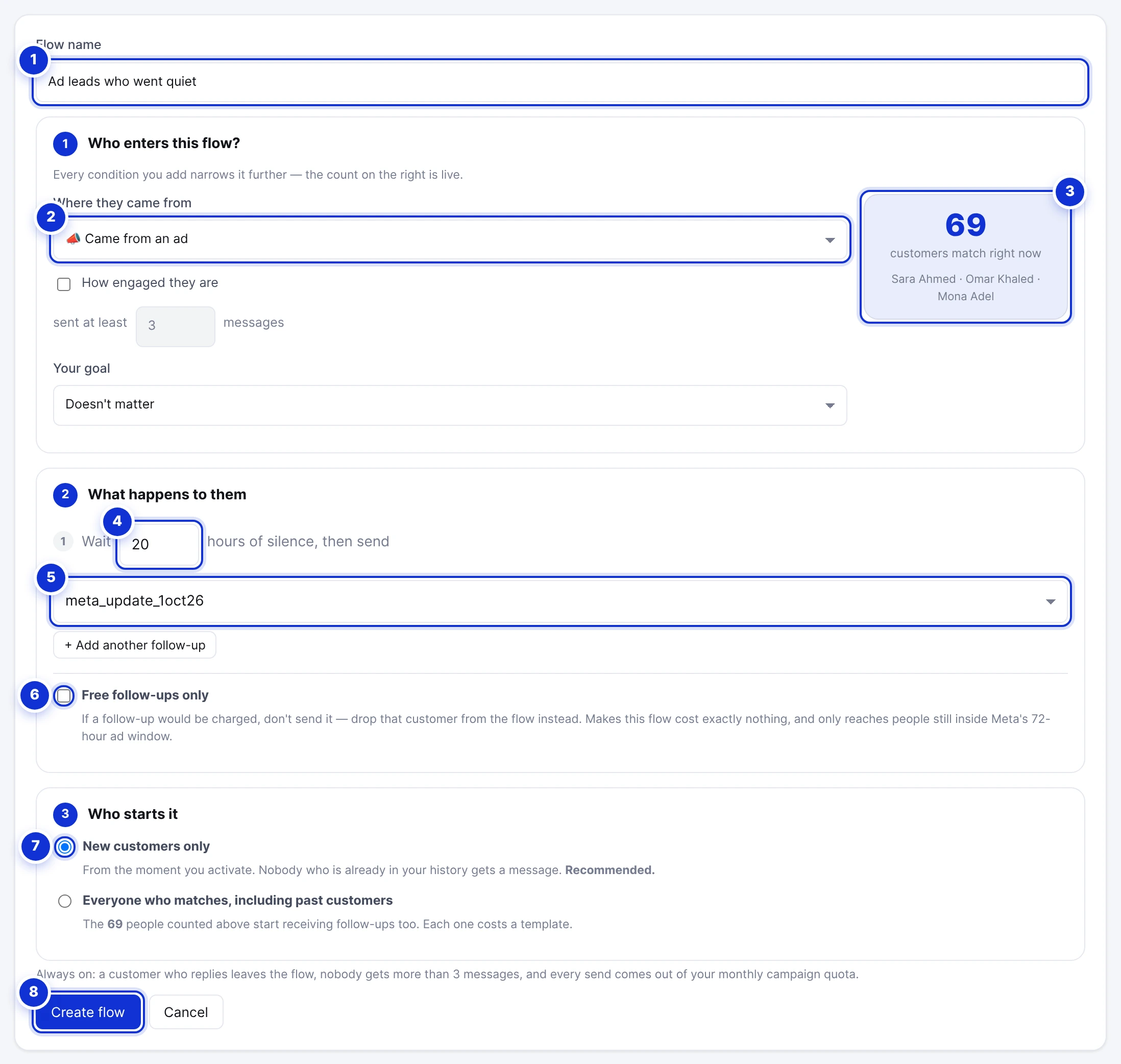
Evidence from a real store: an Egyptian cash-on-delivery store set up one follow-up of this kind for a service purpose — a «your order is out for delivery» message two hours after the customer confirmed the order. 155 orders entered it, 144 received the message without anyone pressing a button, and 6 left before it was due. A post-delivery offer works exactly the same way, with a marketing template instead of a utility one.
Message 3: winning back lapsed customers
Every store has customers who bought once or twice and then disappeared. They were not unhappy and they did not block the number. They forgot. One message at the right moment, with an offer they cannot get elsewhere, brings some of them back.
How it works: in Store orders → Audiences you build a list from a rule: bought between 90 and 180 days ago, has not bought since, and has not had a message from us in the last 30 days. The list refreshes itself every night and shows up in Campaigns like any other list. Customers who lapse join it; customers who buy leave it.
Template:
Hi {{1}}, we've missed you at {{2}}.
New products arrived this month, and we've set aside 15% off them for you until the end of the week.
[See what's new]  [Copy code]
Here the decision to send stays with you: the list is always ready, and you choose when to send it and with which offer.
Message 4: the seasonal offer to a chosen list
Black Friday, Ramadan, Eid, back to school. These offers go to almost everyone — but «everyone» does not mean every number that ever passed through the store. The better list is customers who bought in the last year, agreed to marketing, and have not had a marketing message in the last few days.
Two tips from the numbers below:
- Spread the list over several days instead of sending it all in one hour. A new WhatsApp number starts at 250 people a day and the limit rises with good use.
- Do not send the same person two offers in one week. Meta caps how many marketing messages a person receives from all businesses combined, and the extra message is simply not delivered.
Message 5: answering whoever replies
Every message above exists to make the customer write back. And the moment they write «Is size L available?» or «How much is delivery to Alexandria?» is when the real selling starts. An offer whose questions are answered hours later loses most of its buyers.
That is why the AI assistant in ExceliaBOT takes these conversations. It answers from your products, their prices and your instructions, and sends products as a picture carousel the customer swipes through, with «Details» and «Order» under each one. If the customer wants a person, it hands the chat to your team.
There is a real saving here too. A reply inside the conversation is a service message, not a marketing one. Meta gives every number 1,000 free service messages a month, and after that about $0.0036 a message in Egypt — about 18 times cheaper than a marketing message.
Why a quarter of marketing messages are not delivered
We went through every marketing message ExceliaBOT clients sent between 4 October and 9 November 2026: 165 campaigns from three accounts, 7,950 messages. 2,067 were not delivered — 26%. Here are the reasons, as Meta reported them:
| Reason | Messages | What it means |
|---|---|---|
| Meta's per-user marketing limit (131049) | 623 | The person had received many offers recently from different businesses, so yours was not delivered |
| Number not on WhatsApp (131026) | 538 | A wrong number, or one not registered on WhatsApp |
| Spam rate limit (131048) | 419 | One number sent too much in a short time, and Meta slowed it down |
| Payment issue on the business's Meta account (131042) | 212 | No valid payment method on the WhatsApp Business account |
| Meta experiment (130472) | 138 | Meta withholds marketing messages from a small share of users as a test |
| Plan's monthly campaign allowance used up | 99 | Sending stopped at the plan's monthly limit |
Three of these come from sending too much, not from bad numbers: the per-user limit, the spam limit, and part of the undelivered messages. That is exactly why the abandoned cart message and the post-delivery offer beat a big campaign: each goes to one person, at their moment, for a reason they recognise.
Four rules that protect your number:
- Message people who know you. A customer who bought, left a cart or wrote to you. Never buy number lists.
- Keep the frequency down. Exclude anyone who had a marketing message in the last 7 to 30 days. That exclusion is part of every store list.
- Let people out. Whoever writes STOP leaves every marketing campaign and follow-up, and keeps receiving their order messages.
- Watch your quality rating. If Meta turns your number's rating yellow, pause campaigns for two days.
What automated offers cost
Every message has a price you pay Meta directly from your own account; we add nothing on top. In Egypt:
- A marketing message (the offer, the cart reminder, the win-back): about $0.0644 per delivered message.
- A utility message (order and shipping updates): about $0.0036.
- A reply inside the conversation: 1,000 free a month per number, then $0.0036.
VAT is added to all of these, and a message that is not delivered is not charged.
An example: a store that sends 300 abandoned cart reminders a month pays Meta about $19. If the reminders bring just 20 customers back to checkout, they cost less than a dollar per recovered order.
How to start on ExceliaBOT
- Connect your store: Shopify, Salla or Easy Orders in one click, or any store through the webhook.
- Create the templates in Campaigns → Templates: the offer text, an image if you like, and «Complete my order» or «Copy code» buttons. Meta approves most templates within minutes.
- Set up the follow-ups: one for left carts, one after delivery.
- Build your lists in Store orders → Audiences: lapsed customers, everyone who bought in the last year.
- Turn on the AI assistant so whoever replies to an offer gets an answer.
The Free plan is enough to try it: 250 campaign messages a month. Start free and set up your first message today.
Frequently asked questions
What is WhatsApp marketing automation?
Your marketing messages go out on their own based on what the customer does — leaves a cart, receives an order, goes quiet for a while. Instead of gathering numbers and sending to everyone each time, you set the rule once.
Does the abandoned cart message work with every store?
It works with Shopify and Salla, because both report left checkouts. Easy Orders does not report them yet, but order messages and post-delivery follow-ups work with it.
Can I send a coupon code in a WhatsApp message?
Yes. The template has a «Copy code» button; the customer taps it and the coupon is copied, ready to paste at checkout.
How many marketing messages should one customer get?
There is no fixed number, but Meta withholds extra messages from a person who has received many offers. Exclude anyone who had a message in at least the last week, and never send more than two for the same cart.
Do I need to write code?
No. Connecting the store, building the lists and setting up the follow-ups are all done from the dashboard.
What if nobody replies to the offer?
The follow-up ends at its last message and never sends more than the limit you set. Anyone who did not engage with two offers in a row is better left out of the next campaign.
Sources: Meta's documentation on WhatsApp pricing and WhatsApp API error codes; ExceliaBOT help center articles on Follow-ups, Store orders and Audiences. Figures from ExceliaBOT clients' campaign messages between 4 October and 9 November 2026, and from one Egyptian store's follow-up on the platform, excluding our own and demo accounts.