Most people searching for a "WhatsApp bot" want one thing: someone answering customers when they can't. The real question is not whether you need a bot but when your messages arrive. We counted that from the WhatsApp messages customers sent to businesses on our platform over the last three months: more than half arrived outside normal working hours.
This guide explains what a WhatsApp chatbot is, the difference between the official WhatsApp API and the tools that get numbers banned, whether a free WhatsApp bot really exists, then how to make one on a free ExceliaBOT account in minutes, with no code and without paying anything. Last, how to create a WhatsApp link that takes customers straight to the bot.
In short
- 56% of customer messages on WhatsApp arrived before 9 am or after 5 pm, and 27% between 9 pm and 6 am.
- The AI bot on our platform answers in 7 seconds on median, and within 15 seconds 99% of the time.
- Use the official WhatsApp API from Meta only. "Scan the WhatsApp Web code" tools break WhatsApp's terms and can get your number banned.
- Free WhatsApp bot? Yes: open a free ExceliaBOT account, connect your number, and the bot starts answering your customers. You start with a 15-day trial of up to 500 replies, then stay on the Free plan (50 replies a month) with no time limit and no card.
- A WhatsApp link is simple:
https://wa.me/followed by your number in international format, and it can carry a pre-written message.
What is a WhatsApp bot?
A WhatsApp bot (or WhatsApp chatbot) is software that receives customer messages on your business's WhatsApp number and answers them by itself. Three very different things share the name:
| Type | What it does | Where it stops |
|---|---|---|
| WhatsApp Business auto-reply | One fixed greeting or away message. | Answers no question at all. |
| Menu bot | "Press 1 for prices, 2 for branches." | Customers type their question in their own words, and it is rarely one of the options. |
| AI bot | Understands the message, answers from your business information, shows products, records the order or booking, and hands over to your team when needed. | It knows only what you gave it, which is why it must answer from your information, not guess. |
When people say "WhatsApp chatbot" today they usually mean the third kind. We explained in an earlier post how an AI WhatsApp bot answers from your own files; here we start from the beginning.
When do customers write? Numbers from 40,498 messages
We took every message a customer sent to any business on the platform over WhatsApp between 12 August and 10 November 2026, excluding our own accounts, and looked at the time it arrived (Cairo time):
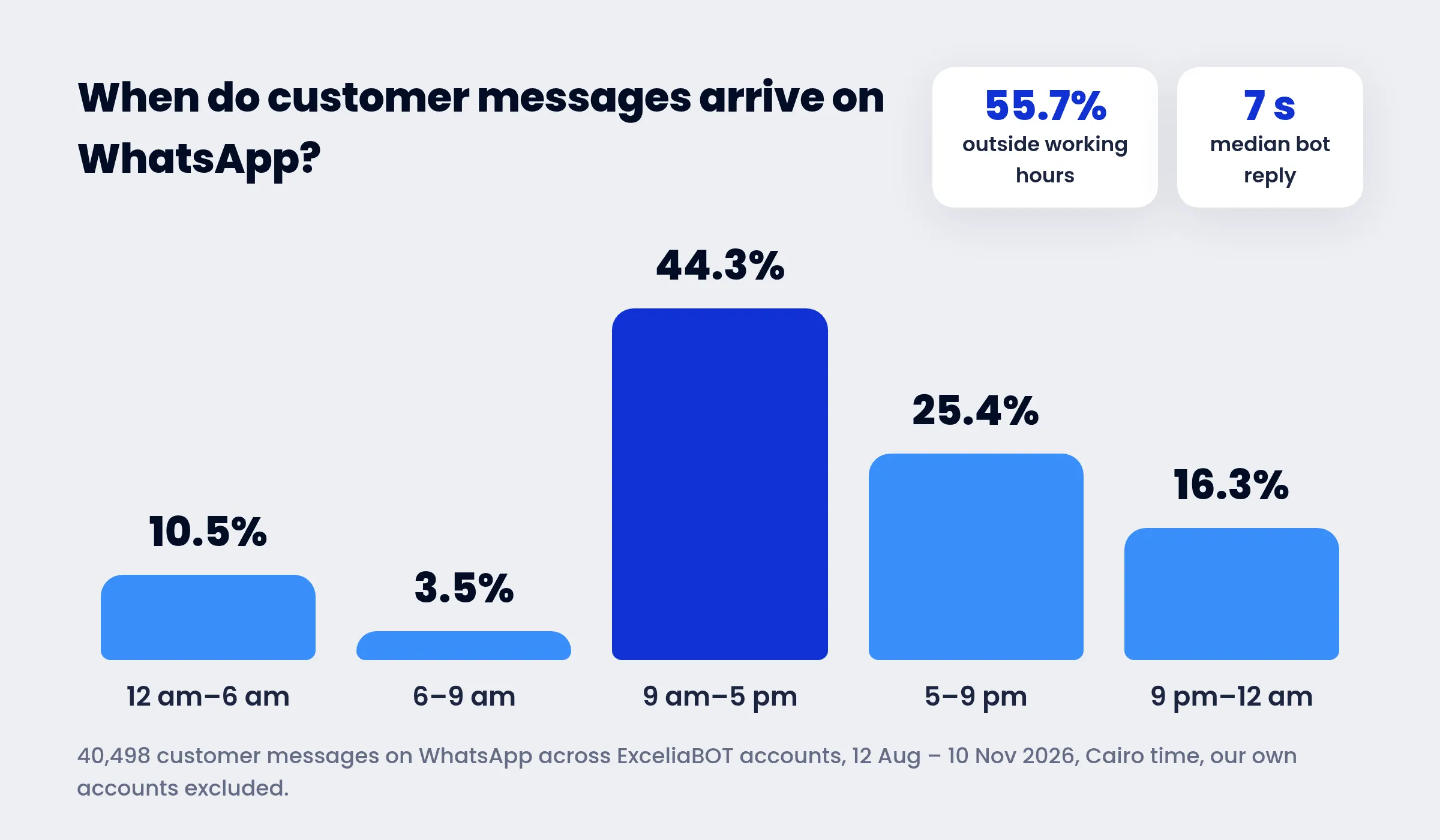
- Only 44.3% arrived between 9 am and 5 pm.
- 25.4% between 5 pm and 9 pm, when most teams leave work and most customers pick up their phones.
- 16.3% between 9 pm and midnight, and 10.5% from midnight to 6 am.
A business that answers only in working hours leaves more than half its customers waiting until morning, and many of them have bought elsewhere by then. That gap is what a bot fills.
On the other side, we measured the reply speed across 7,666 AI replies the bot sent on WhatsApp for 24 businesses over the same period: 7 seconds median from the customer's message to the reply, and 90% within 10 seconds. Part of those seconds is deliberate: the bot waits a moment for the customer to finish, because many people type one question as three messages in a row.
WhatsApp API: official vs unofficial
This matters more than anything else, because the wrong choice here can cost you your number.
The official WhatsApp API (the WhatsApp Business Platform, or Cloud API) is the interface Meta provides for businesses. Your number is connected through Meta itself, messages reach the bot through Meta's servers, and you pay Meta known fees on certain kinds of messages. This is what ExceliaBOT and every approved platform run on.
Unofficial tools ask you to scan a QR code from "WhatsApp Web", then drive your account as if they were you. They look easier and cheaper, but they:
- Break WhatsApp's terms, and WhatsApp detects this behaviour and bans numbers, sometimes for good.
- Stop working whenever WhatsApp Web changes or the phone goes offline.
- Don't protect your customers' data: an unknown tool reads every conversation you have.
A simple rule: if a tool asks you to scan a "WhatsApp Web" code to run a bot, it is not the official WhatsApp API.
Do I lose the WhatsApp Business app on my phone?
Not necessarily. Meta now lets a number that runs on the WhatsApp Business app connect to the API while keeping the app on your phone (Coexistence). You scan a code from the app when connecting, messages keep reaching your phone as before, and the bot answers at the same time. If you reply to a customer from your phone, the bot steps back in that conversation for six hours so it doesn't talk over you.
Is there a free WhatsApp bot?
Yes. On ExceliaBOT you open a free account and run the AI bot on your own number, with no card and no expiry date:
| First 15 days (free trial) | Then: Free plan | If you need more: Base plan | |
|---|---|---|---|
| AI replies a month | up to 500 | 50 | 1,000 |
| Campaign messages | up to 500 | 250 | 1,000 |
| Price | Free | Free | $9.99 a month (499 EGP in Egypt) |
The free account is not a cut-down demo: it is the same bot, on the official WhatsApp API, with everything it does (replies in the customer's dialect, voice notes and photos, products, handing over to your team). A small business may need nothing more, and anyone whose customers grow adds replies only when they need them.
What stays outside our account is Meta's message fees, which are the same on every platform: every number gets 1,000 free replies a month inside conversations the customer starts, so a small business pays Meta nothing for replies. Details in our post on WhatsApp's new pricing.
Be wary of an "unlimited free WhatsApp bot" that asks you to scan a WhatsApp Web code: it runs unofficially, and the price may be your number itself.
How to make a free WhatsApp bot (step by step)
You need no developer, no server and no API keys. Every step happens in your free account, and it takes 10 to 20 minutes:
- Open your free account from the sign-up page with your business name and email. No card, no payment.
- Connect your WhatsApp number from Connections → WhatsApp. Meta's window opens, you pick your business account and number, and confirm. No keys to copy, no servers to set up. (Step-by-step with screenshots)
- Teach the bot your business. Tell it who you are, what you sell, your prices and delivery on the AI Prompt page, or let it write them for you from your website or your files. If you have a store on Shopify, Salla or Easy Orders, it reads your products and prices by itself.
- Test it yourself. Message it from another number with the questions your customers actually ask, and correct what needs correcting.
- Switch it on. Every new account starts with the bot paused, so it never answers before you've checked it. One click turns it on.
- Decide when it stops. The bot hands the conversation to your team when a customer asks for a person or complains, and records orders and bookings on the Goal page for you to follow up.
What the bot then does without you:
- Answers in the customer's language and dialect, Arabic or English.
- Understands voice notes and photos customers send.
- Shows products with pictures and prices in cards the customer can swipe through.
- Shows the customer "typing…" while it prepares the reply.
- Works on Messenger, Instagram and your website with the same instructions.
Ready? Open your free account now and put the bot on your number today.
WhatsApp link: how customers reach the bot
A bot does nothing if customers don't know how to message you. The easiest way in is a direct WhatsApp link:
https://wa.me/201xxxxxxxxx
Write the number in international format, with no + sign and no leading zeros (Egypt 20, Saudi Arabia 966, the UAE 971, the UK 44). You can add a message the customer finds already typed:
https://wa.me/201xxxxxxxxx?text=Hi%2C%20I%27d%20like%20your%20prices
Where to put it:
- In your Instagram bio and Facebook page, and on the "Send message" button.
- In a QR code on the shop, the box or the receipt. Any QR generator turns the link into a code.
- In ads: Meta's click-to-WhatsApp ads open the chat directly, and the bot starts answering at once. See our click-to-WhatsApp ads guide.
- On your website: a WhatsApp button, or the website chat where the same bot answers inside the page, with a button to continue on WhatsApp.
Five common mistakes when running a WhatsApp bot
- Switching it on before testing it. Ask it your customers' real questions first, especially prices, delivery and returns.
- Stale instructions. The price changed and the bot wasn't told, so it promises the customer what you no longer offer.
- No way to a human. An angry customer wants a person. Have the bot hand complaints to the team and step back.
- Unchecked campaigns from the same number. Lots of messages to people who didn't ask lower your number's quality with Meta. Message people who dealt with you, and let anyone opt out.
- Letting it make things up. If it can't find the answer in your information, it should say so and hand over, not guess.
FAQ
Can I make a WhatsApp bot for free?
Yes. Open a free ExceliaBOT account: up to 500 replies in the first 15 days, then 50 replies a month with no time limit and no card. Meta also gives every number 1,000 free replies a month inside customer conversations.
Do I need a developer to make a WhatsApp bot?
No. You open a free account, connect your number through Meta's window in a few clicks, and give the bot your business information or let it write it from your website. No code, no servers.
Will my number get banned for using a bot?
A bot on the official WhatsApp API doesn't put your number at risk for replying. What does is unofficial tools that run through "WhatsApp Web", or sending lots of marketing messages to people who didn't ask for them.
What's the difference between WhatsApp Business and the WhatsApp API?
WhatsApp Business is an app on your phone with a simple fixed auto-reply. The WhatsApp API is an interface for software, which the AI bot and campaigns run on, and with Coexistence both can run on the same number.
Do I need a new number?
No. You can connect your current number, and in most cases keep the WhatsApp Business app on your phone.
Does the bot reply in Arabic dialects?
Yes. It answers in the customer's language and dialect, Egyptian, Gulf or other, and in English for those who write in English.
Can I reply myself at any time?
Yes. You read every conversation in the dashboard or the phone app and reply yourself whenever you like, or pause the bot in one conversation or on the whole account.
Does the bot work on Instagram and Messenger?
Yes. The same account answers on WhatsApp, Messenger, Instagram and your website chat with the same instructions.
Sources: Meta's documentation on the WhatsApp Cloud API and WhatsApp message pricing; ExceliaBOT help center articles on connecting channels, AI replies and the reply window; the numbers come from customer messages to ExceliaBOT accounts on WhatsApp between 12 August and 10 November 2026, excluding our own accounts.